Shopify Skills for Claude Code: Theme, Liquid, Admin API and CLI
Shopify skills for Claude Code are SKILL.md folders that teach Claude one Shopify development job and load only when that job comes up. This page covers Shopify’s official skills and Dev MCP server, then publishes six skills of our own in full: Liquid theme edits, Admin GraphQL with cost limits, Storefront API, the CLI workflow, a theme performance audit, and metafields.
Built by our community of 2,000 marketers
Free skills and prompts for Shopify, paid ads and SEO
Templates for Claude Code, Claude, ChatGPT and Perplexity.
Clients we work withClients we
work with







Official Claude connector
Connect Claude to your Shopify store
Connect 50+ marketing tools, plus free skills and a Claude autonomous marketing agent.
Connect in 1 click





A Shopify skill for Claude Code is a folder with a SKILL.md inside: a name, a one-line description of when it applies, the rules, the steps, the input it expects and the output it must return. Claude reads only the name and description of every installed skill; the full file loads when your request matches. Install one once and “add a trust-badges section under the buy box” produces a section with a schema, an asset stylesheet and a locale key every time, on every theme, for every developer on the team.
Shopify now publishes its own. The Shopify AI Toolkit repo ships 22 skills (MIT, updated September 2, 2026) and the Dev MCP server that validates what they write. That is the headline. The six skills lower on this page are the opinionated layer we run on top: they encode how a change should be made in a real theme repo, which the official skills leave to you. Merchant workflows are not here; the Shopify CRO skills for merchants and the operations skills every merchant should set up have their own pages.
The short version
Official — 22 Shopify skills in Shopify/Shopify-AI-Toolkit; install with npx skills add Shopify/shopify-ai-toolkit
Validation — the Dev MCP (@shopify/dev-mcp) runs locally, no auth, checks GraphQL, Liquid and theme files
Ours — six SKILL.md files below, paste into .claude/skills in the theme or app repo
The rule — skills decide how; the MCP checks; the CLI ships; nothing reaches the live theme without --allow-live
What a Shopify skill for Claude Code is
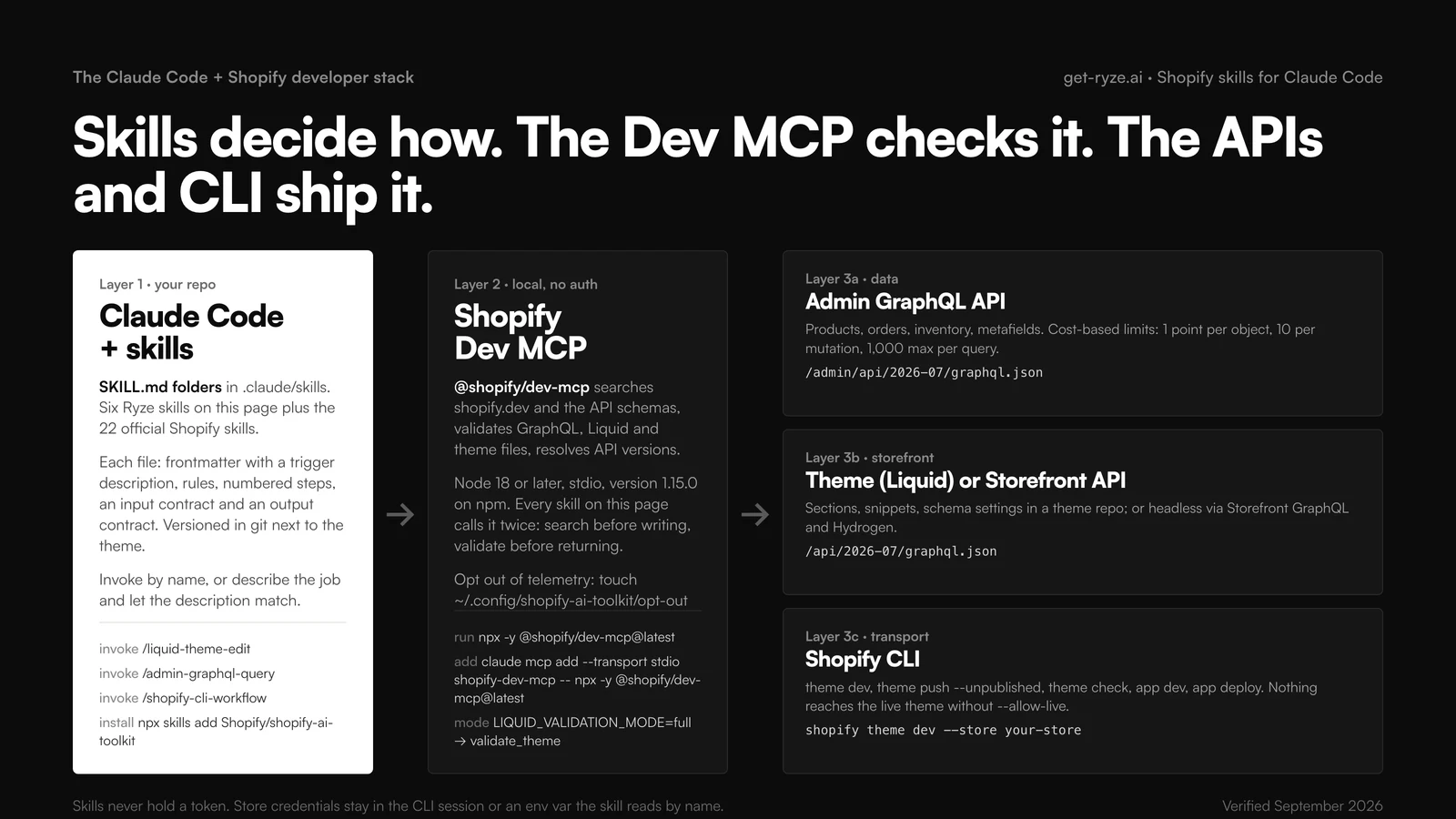
The format is Anthropic’s Agent Skills: a folder, a SKILL.md with YAML frontmatter (name, description), then instructions, and optionally scripts and reference files. Shopify’s official skills use exactly this shape and add two scripts per skill: scripts/search_docs.mjs, which searches shopify.dev for the surface the skill covers, and scripts/validate.mjs, which validates generated code against the schema. The official shopify-liquid skill tells the agent it must search before writing and validate before returning, with at most three retries.
Three things get confused in every “Claude Code for Shopify” thread, and they solve different problems. A prompt is one chat; it drifts every time it is retyped. A skill is a saved way of working: the steps, the rules, the output contract, versioned in the repo next to the theme. The Dev MCP is a local server that gives Claude the documentation and the schemas, so a skill’s “search the docs, then validate” step has something to call. The CLI and the APIs are the transport. Skills never hold a token; credentials stay in the Shopify CLI session or an environment variable the skill reads by name.
Where Ryze fits: nowhere in this stack. Ryze AI runs the store’s paid ads and SEO after the store is built; the skills here are for the people building it. We wrote them because the official set answers “is this valid Shopify code” and left “is this how we make changes in this repo” open.
Which Shopify skill for which developer job
Official skill names are from the skills folder of the Shopify AI Toolkit. Ryze skills are the six published below. The last column is what has to be running for the skill to do its job.
| Dev job | Skill | Also | Needs |
|---|---|---|---|
| Add or change a theme section | liquid-theme-edit | shopify-liquid (official) | Dev MCP + theme dev |
| Fetch or change store data | admin-graphql-query | shopify-admin (official) | Dev MCP + Admin token, or shopify app execute |
| Headless or custom storefront | storefront-api-headless | shopify-storefront-graphql, shopify-hydrogen | Dev MCP + Storefront token |
| Preview, push, publish, deploy | shopify-cli-workflow | shopify-use-shopify-cli (official) | Shopify CLI logged in |
| Store is slow | theme-performance-audit | PageSpeed export, optional | CLI theme profile + Dev MCP |
| Custom product data, specs, FAQs | metafields-and-metaobjects | shopify-custom-data (official) | Dev MCP + Admin token |
| Discount, cart or checkout logic | shopify-functions (official) | app dev + app function run | |
| Admin, checkout or POS UI | shopify-polaris-*, shopify-pos-ui (official) | app dev | |
| Anything else on shopify.dev | shopify-dev (official) | Dev MCP |
Install order that works: the official set first (one command), the Dev MCP second, then paste the two Ryze skills you will use this week, usually liquid-theme-edit and shopify-cli-workflow. Add the rest when the job shows up.
How to install Shopify skills in Claude Code
Commands verified against shopify.dev/docs/apps/build/ai-toolkit, the toolkit README and the npm package page, September 2026.
1. The official skills
Claude Code has a plugin route and a skills route. The plugin installs everything, registers the Dev MCP and keeps itself updated. The skills route lets you pick.
Two things to know before you run it. The skill scripts send usage telemetry to shopify.dev by default, including the search query and, on Claude Code, your most recent prompt when a Shopify skill activates; opt out with touch ~/.config/shopify-ai-toolkit/opt-out or OPT_OUT_INSTRUMENTATION=true. And the repo accepts no pull requests; it is generated from Shopify’s docs, so file issues, do not fork fixes. The older Shopify/agent-skills mirror still exists but was last pushed in June 2026; use the toolkit.
2. The Shopify Dev MCP server
@shopify/dev-mcp (1.15.0 as of September 2, 2026, Node 18 or later) runs over stdio on your machine with no authentication. It searches Shopify’s docs and API schemas, validates GraphQL operations, Liquid and theme files and UI-extension code, and resolves supported API versions. The GitHub page it used to live at returns 404 now; install from npm.
One switch matters for theme work: LIQUID_VALIDATION_MODE defaults to full, which exposes whole-directory theme validation; set it to partial to validate single code blocks instead. The six skills below assume full.
3. Project skills in a theme repo
Claude Code reads ~/.claude/skills/ for personal skills and .claude/skills/ inside a repo for skills that ship with the code. For a theme, use the repo path so the reviewer and the next developer get the same rules. Create one folder per skill, paste the SKILL.md, commit. No restart. Invoke with /skill-name or describe the job and let the description match.
4. Shopify CLI and credentials
npm install -g @shopify/cli@latest, then shopify theme list --store your-store to log in and confirm the theme you are targeting. Admin API tokens for the query skills go in an environment variable; the skills reference the variable by name and never print it. The Shopify-to-Claude connection guide covers the token scopes, and the Shopify MCP setup covers the store-data side for non-developers.
5. Cursor, Codex and the rest
Same files, different paths. Shopify’s toolkit installs in Cursor with /add-plugin shopify, in Codex with codex plugin add shopify@openai-curated, and in VS Code from the repo URL. The six Ryze skills drop into ~/.cursor/skills/ or ~/.codex/skills/ unchanged. Our wider Claude marketing skills guide covers install on claude.ai and Claude Desktop, which matter less here: theme work wants a terminal and a git checkout.
The six Shopify skills, as full SKILL.md files
Each block is the whole file. Copy it into .claude/skills/<name>/SKILL.md. They assume the Dev MCP is attached and Shopify CLI is logged in. None of them pushes to a live theme or runs a mutation without an approval line, and none stores a credential. Shorten the rules to fit your theme; do not shorten the output contract, it is what makes run forty comparable with run one.
01 · /liquid-theme-edit
written by Ryze for this guideLiquid theme edits: sections, snippets, schema settings, no inline CSS drift
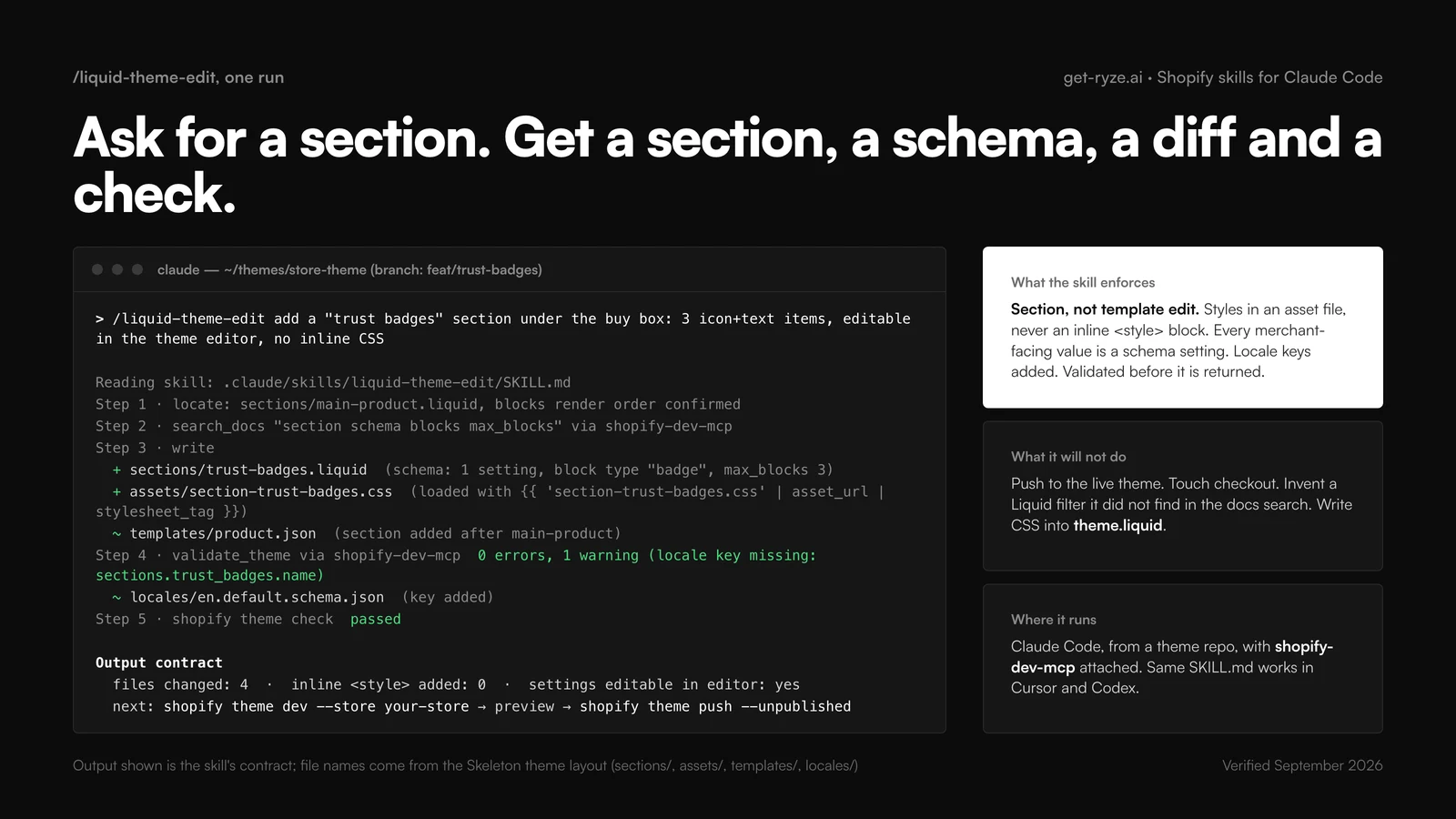
The one you will use most. It refuses the two habits that make themes unmaintainable: styling inside Liquid and hard-coding values a merchant will later ask to change. Every new piece of UI becomes a section or block with a schema, styles go to an asset file, locale keys get added, and the Dev MCP validates the result before Claude returns it.
---
name: liquid-theme-edit
description: Edits or adds Shopify theme sections, blocks and snippets in a theme repo. Use when asked to add a section, change a template, expose a setting in the theme editor, or fix Liquid. Not for Admin API data changes or checkout.
---
You are a senior Shopify theme developer working in a git checkout of the theme.

## Input
A task in plain language, the theme root (sections/, snippets/, assets/, templates/, config/, locales/), and the shopify-dev-mcp server attached. If the target section or template is ambiguous, list the candidates and ask. Do not guess.

## Rules
- New UI goes in a section or block with a {% schema %}. Merchant-facing values are settings, never hard-coded.
- CSS lives in assets/section-<name>.css, loaded with asset_url | stylesheet_tag. No inline <style> in Liquid. No edits to layout/theme.liquid for one section.
- Add locale keys to locales/en.default.schema.json for every new schema label.
- Never touch checkout, layout/password.liquid or config/settings_data.json.

## Steps
1. Read the affected files and the JSON template that renders them.
2. Search the docs through the MCP for every tag, filter or schema attribute you are not sure about.
3. Write the section, the asset file, the template change and the locale keys.
4. Validate the theme through the MCP and run `shopify theme check`. Fix and re-validate, at most three rounds.
5. Stop. Do not run theme push.

## Output
Files changed, one line each. Count of inline style blocks added (must be 0). Whether every value is editable in the editor. Then the next two commands: `shopify theme dev` and `shopify theme push --unpublished`.
Invoke in Claude Code
/liquid-theme-edit add a trust-badges section under the buy box on the product template: three icon-and-text items, editable in the theme editor, no inline CSSNeeds
Theme repo open in Claude Code, shopify-dev-mcp attached, Shopify CLI installed for theme check.
02 · /admin-graphql-query
written by Ryze for this guideAdmin GraphQL queries with cost awareness and pagination
The Admin API is rate limited by calculated query cost, not request count: objects cost 1 point, mutations 10, a single query may not exceed 1,000 points, and the bucket refills at 100 points per second on a standard plan (200 on Advanced, 1,000 on Plus). Connections page with first and after, 250 at most. This skill makes Claude request only what the task needs, page correctly, read the throttle status, and switch to bulk operations past roughly a thousand records.
---
name: admin-graphql-query
description: Builds and explains Shopify Admin GraphQL queries and mutations with query cost, pagination and API version in mind. Use when asked to fetch or change products, orders, inventory, customers or metafields through the Admin API. Not for the Storefront API or theme files.
---
You are a Shopify app developer writing against the Admin GraphQL API, version 2026-07 unless the project pins another.

## Input
What data is needed or what must change, the store domain, and the name of the env var that holds the access token (never the value). The shopify-dev-mcp server should be attached for schema introspection.

## Rules
- Request only the fields the task needs. Objects cost 1 point, mutations 10, and a single query cannot exceed 1,000 points.
- Page every connection with first (max 250) and after; read pageInfo.hasNextPage and endCursor.
- Read extensions.cost.throttleStatus in every response. Back off when currentlyAvailable is below the next query's requestedQueryCost.
- More than roughly 1,000 records: use bulkOperationRunQuery or bulkOperationRunMutation, not a loop.
- Mutations include userErrors { field message }. Stop on the first error.

## Steps
1. Introspect the types involved through the MCP; confirm field names against the pinned API version.
2. Write the operation with variables, never string interpolation.
3. Validate it through the MCP.
4. Estimate the cost and show the number.
5. For mutations, print the dry-run plan and wait for approval before running anything.

## Output
The operation, its variables JSON, the estimated cost, the pagination loop if any, and one paragraph on what could go wrong.
Invoke in Claude Code
/admin-graphql-query list every active product with its variants' SKU and inventory quantity per location, paged, for a stock reportNeeds
shopify-dev-mcp attached for schema introspection; an Admin API access token in an env var, or shopify app execute for one-off runs.
03 · /storefront-api-headless
written by Ryze for this guideStorefront API for headless builds
Headless stores query the Storefront API at /api/2026-07/graphql.json with a public token in the browser or a private token on the server, and the two must never be swapped. The skill fixes that boundary, routes cart work through the cart mutations and checkoutUrl, adds market context, and reminds the developer that on a headless store the SEO plumbing a theme gave for free is now their job.
---
name: storefront-api-headless
description: Writes Storefront GraphQL API queries and cart mutations for headless or custom storefronts (Next.js, Remix, Hydrogen). Use when the task mentions headless, Storefront API, custom storefront or cart. Not for Admin API data or Liquid themes.
---
You are a headless commerce engineer. Endpoint: https://{store}.myshopify.com/api/2026-07/graphql.json

## Input
Framework, whether the query runs in the browser or on a server, and the token type. Public tokens (X-Shopify-Storefront-Access-Token) may ship to browsers. Private tokens (Shopify-Storefront-Private-Token) run server-side only. If the task would put a private token in client code, refuse and explain.

## Rules
- Products, collections and search come from the Storefront API. Never call the Admin API from a storefront.
- Cart: cartCreate, cartLinesAdd, cartLinesUpdate; send the buyer to checkoutUrl.
- Set @inContext(country, language) for markets.
- Metafields return null unless storefront access is public_read. Say so when a field is missing.
- If the project is Hydrogen, prefer its hooks and the official shopify-hydrogen skill over hand-written fetches.

## Steps
1. Confirm the token type and where the code runs.
2. Search the Storefront schema through the MCP.
3. Write the query with one fragment per component and cache hints.
4. Validate through the MCP.
5. Note the SEO work that is now yours: canonical tags, product JSON-LD, prerendering.

## Output
The query or mutation, the fetch wrapper with the correct header, the variables, and a "runs on: server | browser" line.
Invoke in Claude Code
/storefront-api-headless write the product page query for a Next.js app: title, images, variants with price and availability, and a server-side fetch wrapperNeeds
shopify-dev-mcp attached; a Storefront API token of the right type for where the code runs.
04 · /shopify-cli-workflow
written by Ryze for this guideShopify CLI workflow: theme dev, push, pull, publish; app dev and deploy
Shopify CLI already refuses to push to a live theme without --allow-live. This skill turns that guard into a habit: list to confirm the target, pull, dev with editor sync for the preview, check, push unpublished with --strict so theme check must pass, open for the preview link, and publish only as its own explicit step. The app half covers init, dev, extension generation, deploy on request, and app execute for one-off Admin GraphQL.
---
name: shopify-cli-workflow
description: Runs the Shopify CLI theme and app workflow in the safe order: list, pull, dev, check, push unpublished, open, publish; app init, dev, deploy. Use when asked to preview, push, publish, deploy or set up a Shopify project. Refuses to push to the live theme without an explicit instruction.
---
You are a release engineer for Shopify themes and apps. Shopify CLI is installed (npm install -g @shopify/cli@latest).

## Input
Store domain, theme or app, the theme ID or name if known, and the git branch.

## Rules
- Theme changes go to a development or unpublished theme. --allow-live and --live require the words "push to live" in the user's request.
- Use --json for any output you will parse and --strict on push so theme check must pass.
- Run `shopify theme check` before any push.
- Never run `shopify theme delete`. Never commit .env.

## Steps (theme)
1. `shopify theme list --store <store> --json` to confirm the target.
2. `shopify theme pull --development` when starting from the store's current state.
3. `shopify theme dev --store <store> --theme-editor-sync` for the preview; report the URL.
4. `shopify theme check`, then `shopify theme push --unpublished --strict --json`.
5. `shopify theme open --theme <id>` for the preview link. Publishing is a separate, explicit step: `shopify theme publish --theme <id>`.

## Steps (app)
`shopify app init`, `shopify app dev` for the dev store preview, `shopify app generate extension` when asked, `shopify app deploy` only on request. Use `shopify app execute` and `shopify app bulk execute` for one-off Admin GraphQL runs.

## Output
The commands run, in order, each with its exit status, and the preview or version URL.
Invoke in Claude Code
/shopify-cli-workflow preview the current branch on my-store and push it as an unpublished theme named feat-trust-badgesNeeds
Shopify CLI installed and logged in to the store; git branch checked out.
05 · /theme-performance-audit
written by Ryze for this guideTheme performance audit, read-only
Slow Shopify themes are slow for boring reasons: a loop over all_products in a header snippet, twenty sections on a template, a 400 KB hero image with no width, three apps injecting the same slider library. The CLI's theme profile command shows where Liquid time goes; the rest is grep. This skill produces a ranked findings table and never edits a file, so it is safe to run weekly and before any PR that adds JavaScript or images.
---
name: theme-performance-audit
description: Audits a Shopify theme for render and load performance: Liquid loops, section count, asset weight, image sizing, third-party scripts. Use when asked why a store is slow, before a PR that adds JavaScript or images, or for a weekly theme health check. Read-only.
---
You are a Shopify theme performance reviewer. This skill never modifies files. It produces a report.

## Input
The theme root, a store URL for `shopify theme profile`, and optionally a PageSpeed or Lighthouse export.

## Steps
1. Run `shopify theme profile <url>` on the home page, one collection and one product page. Note the slowest Liquid sections.
2. Grep for loops over collections.all and all_products, nested for-loops on product.variants, and {% render %} inside loops.
3. Count sections per JSON template. Flag templates above 15.
4. List assets/ files over 100 KB and images rendered without width, height and an image_url width.
5. List scripts in layout/theme.liquid that are not deferred, and app-injected scripts that duplicate theme code.
6. Include theme validation warnings from the MCP that affect render.

## Output
One table: finding | file | evidence | impact (high, medium, low) | fix. Then the three fixes with the best impact-to-effort ratio, each sized as one PR. Do not include a fix you did not verify in the files.
Invoke in Claude Code
/theme-performance-audit audit the theme in this repo against https://my-store.myshopify.com and rank the findingsNeeds
Theme repo, Shopify CLI logged in for theme profile, shopify-dev-mcp for validation warnings.
Image sizing is the finding that comes up on almost every audit; the fix pattern is in how to lazy-load Shopify product images the right way. For the crawl and index side of the same theme, run the technical SEO audit alongside it.
06 · /metafields-and-metaobjects
written by Ryze for this guideMetafields and metaobjects: model, create, expose
Custom data on Shopify is a metafield (a typed namespace.key on an existing resource) or a metaobject (a standalone type with several fields, referenced from products). Getting the choice wrong early is expensive: a size chart as fifteen product metafields becomes a migration later. The skill forces the decision, writes the definition mutation first, then the values, then shows the Liquid path or Storefront query that reads them, with storefront access set only when the storefront needs it.
---
name: metafields-and-metaobjects
description: Designs and creates Shopify metafield and metaobject definitions, writes their values through the Admin GraphQL API, and exposes them in Liquid or the Storefront API. Use when asked to add custom product data, size charts, specs, FAQs or structured content to a store.
---
You are a Shopify data modeler. Definitions first, values second, storefront exposure third.

## Input
The data to store (fields, types, which resource it belongs to), whether the storefront needs to read it, and the store domain. The shopify-dev-mcp server should be attached.

## Rules
- A one-off attribute on an existing resource: a metafield with a definition (namespace.key, an explicit type, validations).
- A repeated structure with several fields (size chart, ingredient, FAQ entry): a metaobject definition, referenced from the product by a metaobject_reference metafield.
- Set storefront access to public_read only when the storefront must read it.
- Never store secrets or personal data in metafields.

## Steps
1. Search the docs through the MCP for the current definition mutations and type names.
2. Write metafieldDefinitionCreate or metaobjectDefinitionCreate with fields and validations.
3. Write metafieldsSet (or metaobjectUpsert) for the values, batched, with userErrors handled.
4. Validate through the MCP. Show the dry-run plan. Wait for approval before running.
5. Show the read side: the Liquid path (product.metafields.namespace.key.value) or the Storefront query.

## Output
The definition mutation, the value mutation, a table of namespace | key | type | storefront access, and the Liquid or Storefront snippet that reads it.
Invoke in Claude Code
/metafields-and-metaobjects add a size chart to apparel products: rows of size, chest, waist, length in cm, editable in admin and rendered on the product pageNeeds
shopify-dev-mcp attached; an Admin API token in an env var; approval before the mutations run.
Once the data model exists, it is also the cleanest source for structured data; metafield-driven schema markup at scale shows the Liquid that turns the same fields into Product JSON-LD, and adding schema without breaking the theme covers where it goes.
Get a free instant audit
Get a free, instant read on your paid ads or SEO — and fix it right away.
Paid ads audit
- Catch wasted spend & broad-match leaks
- Find account structure gaps
- Rank your quickest wins
- Spot PMax & brand-search overlap
- Check conversion-tracking health
- Benchmark CPC vs your industry
- Catch wasted spend & broad-match leaks
- Find account structure gaps
- Rank your quickest wins
- Spot PMax & brand-search overlap
- Check conversion-tracking health
- Benchmark CPC vs your industry
Free · no credit card · instant
SEO audit
- Find keyword & ranking gaps
- Catch technical SEO issues
- Rank your fastest wins
- Surface thin & duplicate pages
- Check indexing & crawl coverage
- Compare backlinks vs competitors
- Find keyword & ranking gaps
- Catch technical SEO issues
- Rank your fastest wins
- Surface thin & duplicate pages
- Check indexing & crawl coverage
- Compare backlinks vs competitors
Free · no credit card · instant
Store migration and headless with Claude Code
“Claude Code to Shopify migration” is two different jobs. The common one is moving a catalog from WooCommerce, Magento or a custom platform onto Shopify; the rarer one is moving a Shopify theme to a headless storefront. The skills above cover both without a migration app.
Moving a catalog onto Shopify
Export the old catalog to CSV or JSON. Have Claude map the columns to Shopify’s product model (product, options, variants, images, inventory per location) and put anything that does not fit into metafield definitions with /metafields-and-metaobjects. Then load it in bulk rather than one productCreate at a time: the Admin API’s bulk import takes a JSONL file uploaded through stagedUploadsCreate, runs bulkOperationRunMutation with productCreate across every line asynchronously, accepts files up to 100 MB, and on API 2026-01 or later allows up to five concurrent operations per app per shop. /admin-graphql-query knows to reach for it past a thousand records. Redirects from the old URLs are the step people forget; generate them in the same pass so rankings survive the cutover. Keep everything on a development store until the counts match, then repeat against production. For the theme, shopify theme init clones Shopify’s Skeleton theme by default; build from there with /liquid-theme-edit.
Going headless
A headless build swaps Liquid for the Storefront API and a framework, usually Hydrogen. Use /storefront-api-headless for the queries and Shopify’s official shopify-hydrogen skill for the framework itself. Know what you are giving up before you start; what breaks in Hydrogen SEO versus Liquid is the honest list. If the goal is to sell inside AI assistants rather than to own the front end, the agentic storefront route is a different project with a different skill set.
A developer cadence: branch, theme dev, validate, PR
Skills pay off on a schedule, not on a bad day. The loop below is one task per branch, one PR per task, and the live theme touched only by an explicit publish after merge. The commands are the ones the CLI skill runs; the skills are the ones that do the work in the middle.
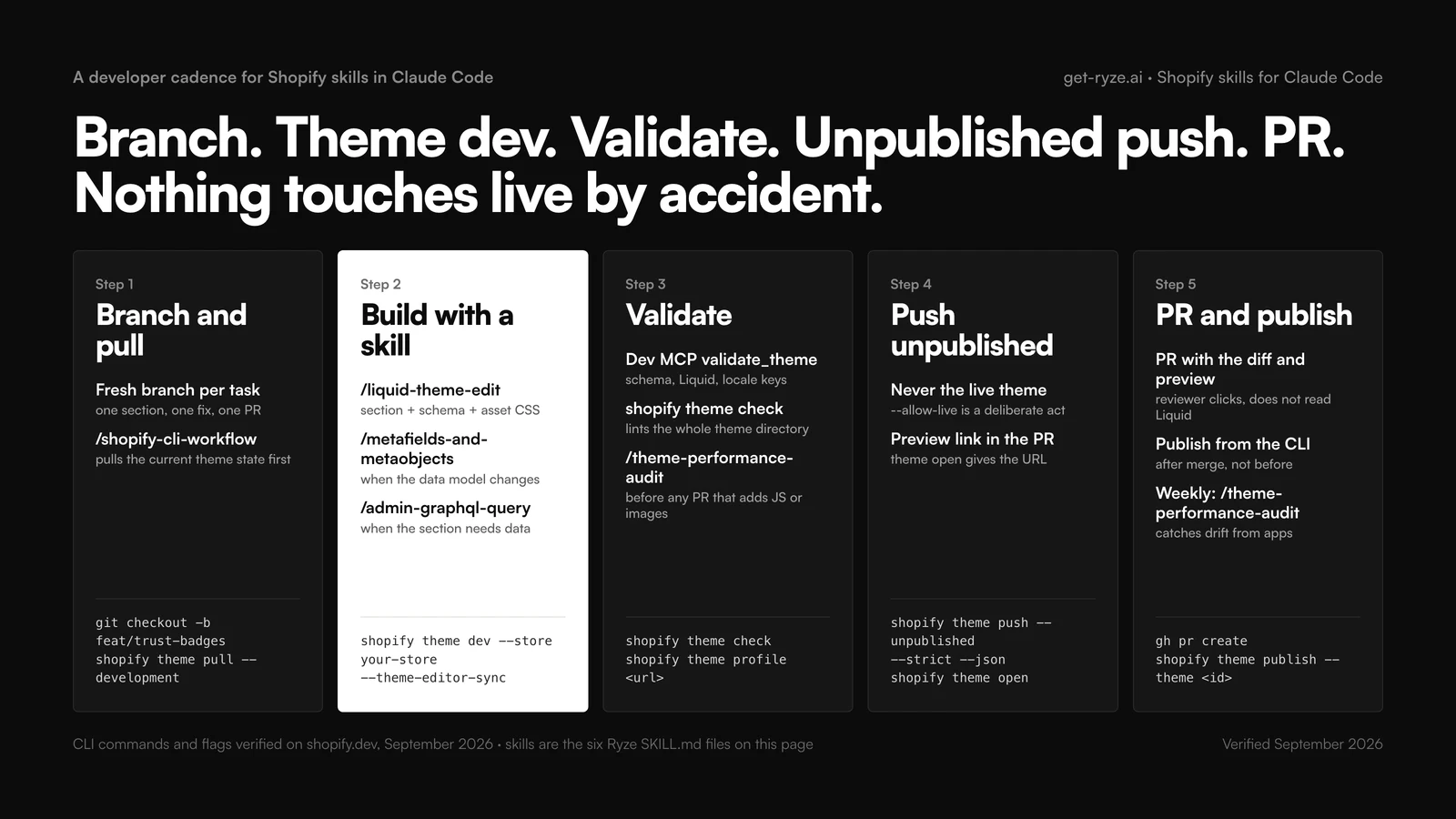
Weekly, run /theme-performance-audit against production even when nothing shipped; installed apps change the theme without a PR. The same idea, applied to store operations rather than code, is in Claude Code loops for Shopify, and the configs senior operators keep next to their skills are in seven Claude configs from top Shopify operators.
Write your own Shopify skill
The six above are a starting set; the skill you need most is the one that encodes your theme’s conventions. Copy the shape of liquid-theme-edit and change four things:
- Description — the trigger. Say what it does, when to use it, and what it is not for, so it does not collide with
shopify-liquid. The official skills use this pattern too (“MUST be used first when prompts mention Metafields or Metaobjects”). - Rules — your conventions: section naming, CSS file per section, which settings every section must expose, what files are off limits.
- Steps — keep the docs search and the validation call; they are the difference between a skill and a prompt with headings.
- Output contract — the exact shape of the answer: files changed, counts, the next command. This is what a reviewer reads and what makes runs comparable.
Test it on a change you already shipped by hand: run the skill on the old branch, diff the two results, tighten the rules until the diff is only the parts you meant to improve. Keep SKILL.md short and move long references (your section catalog, a schema settings style guide) into files in the same folder; Claude pulls them in when needed. A community set worth reading for its rules, not for installing wholesale, is baslefeber/shopify-skills (eight theme skills, MIT).
Troubleshooting
The skill never triggers
The description does not match your phrasing, or it collides with an official skill. Invoke it once by name (/liquid-theme-edit) to confirm it loads, then rewrite the description with the words you use and add a not-for clause.
Validation says the tag or filter does not exist
The Dev MCP validated against a newer or older API version than the theme targets. Pin the version in the skill's role line and re-run; do not let Claude invent a filter it did not find in the search.
theme push refuses to run
You are targeting the live theme. That is the CLI working. Push with --unpublished, or if you mean it, say push to live so the skill adds --allow-live.
Throttled on the Admin API
The query asks for more than the bucket refills. Cut fields, lower first, read throttleStatus and wait, or move to a bulk operation. Do not add retries without a back-off.
Metafield returns null on the storefront
Storefront access is off. Set it to public_read in the definition, or read it through the Admin API server-side instead.
The skill wrote CSS into theme.liquid anyway
The rule is there but a later instruction overrode it. Move the rules above the steps, make the output contract count inline style blocks, and reject any run where that count is not zero.
Frequently asked questions
What are Shopify skills for Claude Code?
Shopify skills for Claude Code are folders with a SKILL.md file that teach Claude one Shopify development job: edit a Liquid section, build an Admin GraphQL query under the cost limit, run the CLI push in the safe order. Claude loads a skill when your request matches its description, so the same job runs with the same checks every time, in every theme repo.
Does Shopify publish official Claude Code skills?
Yes. The Shopify AI Toolkit repo (github.com/Shopify/Shopify-AI-Toolkit, MIT) ships 22 skills including shopify-liquid, shopify-admin, shopify-storefront-graphql, shopify-custom-data, shopify-functions, shopify-hydrogen and shopify-use-shopify-cli. Install all of them with npx skills add Shopify/shopify-ai-toolkit, or one with the --skill flag. Each skill bundles a docs-search script and a validator.
How do I install a Shopify skill in Claude Code?
Two routes. For the official set, run claude plugin install shopify-ai-toolkit@claude-plugins-official, or npx skills add Shopify/shopify-ai-toolkit --skill shopify-liquid. For the six skills on this page, create .claude/skills/<skill-name>/SKILL.md inside your theme or app repo and paste the file. No restart is needed; invoke with /skill-name or let Claude trigger it.
What is the Shopify Dev MCP server and do I need it with skills?
The Dev MCP server (@shopify/dev-mcp on npm, version 1.15.0 as of September 2026) runs locally with no authentication and lets Claude search shopify.dev, introspect the Admin and Storefront GraphQL schemas, and validate GraphQL, Liquid and theme files. Add it with claude mcp add --transport stdio shopify-dev-mcp -- npx -y @shopify/dev-mcp@latest. Skills decide the steps; the MCP checks the code.
Is there a Claude Shopify Liquid skill?
Yes, two. Shopify's official shopify-liquid skill covers the language, sections, blocks, snippets and schemas, and validates generated code. The liquid-theme-edit skill on this page is the opinionated layer on top: sections not template edits, CSS in an asset file rather than inline, every merchant-facing value as a schema setting, locale keys added, and no push to the live theme.
What are Shopify admin skills for Claude Code?
Admin skills write and run operations against the Admin GraphQL API: products, orders, inventory, customers, metafields. The official shopify-admin skill generates and validates the operation. The admin-graphql-query skill here adds cost awareness (1 point per object, 10 per mutation, 1,000 maximum per query), cursor pagination with first and after, throttle handling, and an approval step before any mutation runs.
Can Claude Code push changes to my live Shopify theme?
Only if you tell it to. Shopify CLI refuses to push to the live theme without --allow-live, and the shopify-cli-workflow skill on this page requires the words push to live in your request before it will add that flag. The default path is theme dev for a local preview, theme check, then theme push --unpublished, and publishing as a separate command after review.
How do I migrate a store to Shopify with Claude Code?
Export the old catalog, let Claude map the columns to Shopify's product model and any metafield definitions, then load the catalog as JSONL through stagedUploadsCreate and bulkOperationRunMutation with productCreate. Bulk mutations accept up to 100 MB per file and run asynchronously. Build redirects from the old URLs, start the theme from shopify theme init, and keep the migration on a development store until checked.
Do Shopify skills work in Cursor or Codex?
Yes. SKILL.md is Anthropic's Agent Skills format and Cursor, Codex, Windsurf and VS Code read it. Shopify's toolkit installs in Cursor with /add-plugin shopify and in Codex with codex plugin add shopify@openai-curated. The six files on this page drop into ~/.cursor/skills or ~/.codex/skills unchanged; only the invocation syntax differs from Claude Code.
What is the difference between a Shopify skill and a prompt?
A prompt is one chat and drifts each time it is retyped. A skill is a versioned file in the repo with fixed steps, an input contract and an output contract, so run forty behaves like run one and a new developer inherits the senior's checklist. A skill also carries scripts and references and can require validation before any code is returned.
Are Shopify skills for AI free?
Yes. Shopify's AI Toolkit and its skills are MIT licensed and the Dev MCP server is free to run locally. The six skills on this page are published in full and can be copied without restriction. You need Claude Code or another agent that reads SKILL.md, and a Shopify store or development store to run anything against.
How do I write my own Shopify skill for Claude Code?
Create .claude/skills/<name>/SKILL.md with YAML frontmatter: a name and a description that says when it applies and what it does not cover. Then a role line, an input section that says what to ask for when something is missing, numbered steps that include the validation call, and an output contract. Test it on a change you already shipped by hand and diff the result.
Why does my Shopify skill not trigger in Claude Code?
Usually the description does not match your phrasing, or two skills overlap: shopify-liquid and a custom theme skill both claim section work. Invoke it by name once with /skill-name to confirm it loads, rewrite the description with the words you use, and add a not-for clause. Also check the folder is under .claude/skills in the repo you opened.