Claude Skills for Meta Ads: 6 Meta-Only Skills and 15 Prompts
Claude skills for Meta Ads are SKILL.md files that teach Claude one Meta job, such as spotting creative fatigue or ad sets bidding against each other, and load themselves when that job comes up. This page covers the six Meta-only skills in the Ryze repo, the exact Ads Manager export each one needs, and 15 prompts you can run today on a CSV.
Built by our community of 2,000 marketers
Free skills and prompts for paid ads and SEO
Templates for Claude, ChatGPT and Perplexity.
Clients we work withClients we
work with







Official Claude connector
Connect Claude to your Meta Ads account
Connect 50+ marketing tools, plus free skills and a Claude autonomous marketing agent.
Connect in 1 click






Meta punishes slow reaction. An ad that held 1.3% CTR for two weeks slides to 0.7% in eight days, frequency passes 4, and the CPA damage lands a week after the CTR did. The six skills here exist because those checks are numeric, repeatable, and skipped whenever someone is busy. Each one is a file in the Claude skills for Meta Ads folder of the Ryze marketing-skills repo; this page is the only place each is described in full.
Everything here is Meta-only. Nothing about Google Ads, and nothing that belongs to the cross-platform Claude ads skills, which have their own page. If you have never used a skill, start with the prompts: they are the same instructions without the install step.
The short version
Install first — Creative Fatigue Detection, then Audience Overlap Analysis and Frequency Cap Recommendations
The export — ad-level, last 30 days, breakdown by day; ad-set level with targeting for overlap and frequency
The prompts — 15 below, each written for an Ads Manager CSV; no connector needed
The limit — skills flag and recommend; live data needs an MCP connector; applying changes needs a separate layer
What are Claude skills for Meta Ads?
A Claude skill is a folder with a SKILL.md inside: YAML frontmatter with a name and a description that says when it applies, then the steps, the input and the output. Claude loads the full file only when your request matches the description. The six Meta files add one line to the frontmatter, metadata: platform: Meta, and every description mentions Meta ad sets, frequency, creatives or the Ad Library, so a request about Meta triggers them and a request about search terms does not.
What makes a Meta skill different from a generic one is the input contract. Meta’s problems live in breakdowns: fatigue is invisible without a daily breakdown, overlap is invisible without ad-set targeting, placement waste is invisible without the delivery breakdown. Each skill below names the Ads Manager export it needs, down to the tab, columns and breakdown, because a skill run on the wrong export returns confident nonsense.
Which Meta Ads skill for which problem
Match the symptom to the skill, pull the export in the third column, run it on the cadence in the fourth. The first row is where nearly every account should start.
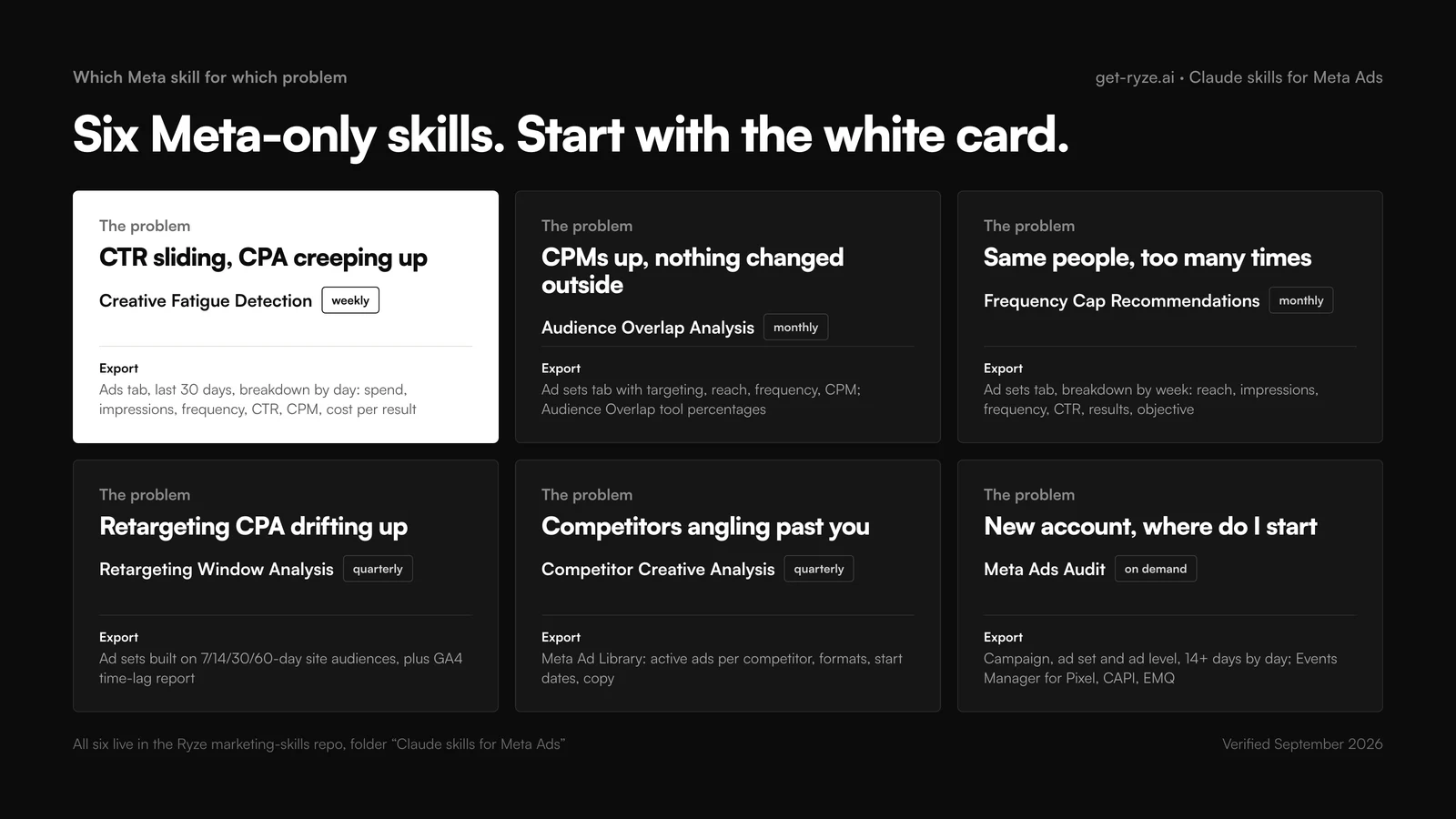
| Meta problem | Skill | Export needed | Cadence |
|---|---|---|---|
| CTR sliding, CPA creeping up | Creative Fatigue Detection | Ads tab, last 30 days, breakdown by day | Weekly, Thursday |
| CPMs up, nothing changed outside | Audience Overlap Analysis | Ad sets tab with targeting, reach, frequency, CPM; Audience Overlap tool | Monthly |
| Same people see the ad too often | Frequency Cap Recommendations | Ad sets tab, breakdown by week, with objective | Monthly, and after scaling |
| Retargeting CPA drifting up | Retargeting Window Analysis | Ad sets on 7/14/30/60-day site audiences; GA4 time-lag report | Quarterly |
| Competitors angling past you | Competitor Creative Analysis | Meta Ad Library: active ads, formats, start dates, copy | Quarterly, before creative planning |
| New account, where to start | Meta Ads Audit | Campaign, ad set and ad level, 14+ days by day; Events Manager | Onboarding, then monthly |
How to install Claude skills for Meta Ads
The six files live in one folder of the Ryze marketing-skills repo. Put each SKILL.md in its own folder named after the skill before installing. The repo root also ships all-marketing-skills.zip if you want the whole library at once.
claude.ai (web and mobile)
Go to Settings › Capabilities and turn on code execution and file creation. Open Customize › Skills, click +, Create skill, Upload a skill, upload the folder as a zip, toggle it on. Then attach an export and ask in plain words: “which of these ads are fatigued?” Claude picks the skill and says so.
Claude Code
Copy each folder into ~/.claude/skills/ for yourself or .claude/skills/ inside a repo for the team. Invoke with /creative-fatigue-detection or let Claude trigger it. This is where the Thursday check becomes a script: pull the export, run the skill, write the table to a file.
~/.claude/skills/creative-fatigue-detection/SKILL.md
~/.claude/skills/audience-overlap-analysis/SKILL.md
~/.claude/skills/frequency-cap-recommendations/SKILL.md
.claude/skills/meta-ads-audit/SKILL.md # shared with the team
Claude Desktop and Cowork
The desktop app shares your claude.ai skills and adds a schedule. Give Creative Fatigue Detection a Thursday 08:00 slot and the flagged list is waiting before you open Ads Manager. Claude Cowork for Meta Ads walks through the scheduled setup.
Connector note. A skill does not grant data access. Without a connector it works on the file you attach. With the Claude MCP connector for ad accounts attached, delete the “attached export” wording from any prompt below and Claude queries the account itself. Keep it read-only for analysis; which Claude connector for Meta Ads compares the options.
The six Claude skills for Meta Ads
Each card shows the repo file, the export to pull, the frontmatter that triggers it, the prompt it wraps so you can run it before installing anything, and the output shape. Cadence is ours; the thresholds are the files’.
01 · Creative Fatigue Detection
Ryze04-meta-creative-fatigue-detection.mdCatch decaying ads before the CPA shows it
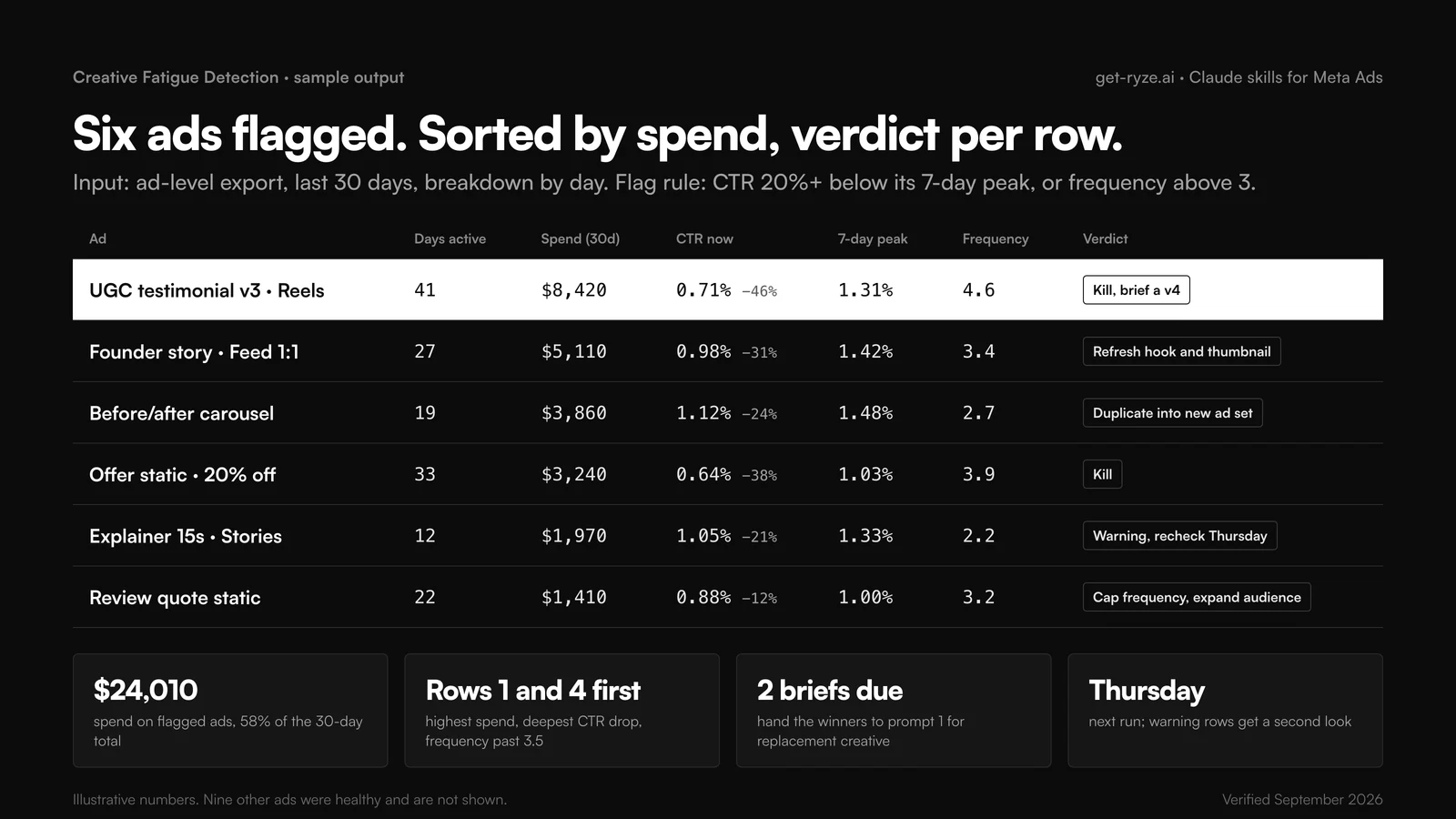
Tracks CTR trajectory, frequency buildup, CPM movement and engagement decay per ad and sorts every active ad into urgent, warning or healthy. The file’s rule of thumb: three or more days of consistent decline is fatigue, not noise. Higher budgets burn creative faster, so rerun it after scaling.
Export it needs: Ads Manager › Ads tab, last 30 days, Breakdown › By time › Day. Columns: ad name, ad set, amount spent, impressions, reach, frequency, CTR (all), CPM, results, cost per result. Export as CSV.
Output: one table, ad | status | days active | spend | peak CTR | current CTR | drop % | frequency | verdict, sorted by spend; then days of life left for warning ads and a rotation schedule.
02 · Audience Overlap Analysis
Ryze08-meta-audience-overlap-analysis.mdFind the ad sets bidding against each other
Maps overlap between ad sets from their targeting (custom audiences, lookalikes, interest stacks, age and gender, geo) and cross-checks it against delivery so you learn which overlap is inflating CPMs and which is theoretical. The file’s example: three of six prospecting ad sets sharing 60%+ of their audience ran 28% higher CPMs than the rest.
Export it needs: Ads Manager › Ad sets tab, last 30 days, no breakdown. Columns: ad set name, campaign, targeting (audience), reach, impressions, frequency, CPM, results, cost per result. Add the percentages from Audiences › select 2 to 5 audiences › Show Audience Overlap if you have them.
Output: an overlap map of ad-set pairs with severity, the estimated CPM inflation, the specific interests, lookalikes or custom audiences causing it, and consolidation or exclusion recommendations with projected savings.
03 · Competitor Creative Analysis
Ryze13-meta-competitor-creative-analysis.mdRead the Ad Library for angles nobody is running
Breaks a competitor’s active ads into formats, messaging themes (pain point, benefit, social proof, urgency), CTAs, offers and refresh rate, then maps that against your own creative to find white space. The file’s example finds three SaaS competitors all leading with feature comparisons and demo CTAs, and none using testimonial creative with a trial offer.
Export it needs: No Ads Manager export. Open the Meta Ad Library, filter by advertiser, and collect for 3 to 5 competitors: number of active ads, format per ad, primary text and headline, CTA, and start date. Paste as text or a table. Ryze’s competitor Ad Library view collects the same fields.
Output: a per-competitor inventory by format, theme and CTA, refresh rate, messaging gaps you can own, and a launch timeline that shows strategy shifts. Pairs with the automated creative workflow in automated ad creation.
04 · Frequency Cap Recommendations
Ryze18-meta-frequency-cap-recommendations.mdFind the frequency where impressions stop converting
Correlates frequency with conversion rate, CTR and CPA per campaign type to find the inflection point, then recommends caps by objective and estimates the spend you would redirect to fresh reach. The file’s example: prospecting conversion rate peaked at frequency 2.3 and fell 40% by 4, while the account averaged 5.1; recommended cap 3 per 7 days for prospecting, 5 for retargeting.
Export it needs: Ads Manager › Ad sets tab, last 30 days, Breakdown › By time › Week. Columns: ad set name, campaign objective, reach, impressions, frequency, CTR, results, cost per result, amount spent.
Output: the frequency distribution, optimal frequency per campaign type from your own data, recommended caps with projected savings, and the reach that spend would buy instead.
05 · Retargeting Window Analysis
Ryze22-meta-retargeting-window-analysis.mdSize the retargeting window from conversion lag, not habit
Uses time-to-conversion data to decide whether the 30-day window should be 7, 14 or 60 days per segment, and where retargeting spend stops returning. The file’s example: 78% of conversions from Meta-sourced visitors landed within 7 days and 4% after day 14, so the 14 to 30-day window for that traffic was cut.
Export it needs: Two inputs. Ads Manager › Ad sets tab for ad sets built on website custom audiences of 7, 14, 30 and 60 days: spend, results, cost per result, frequency, last 90 days. Plus the GA4 Advertising › Attribution › Time lag report, or your own days-to-conversion export, split by source.
Output: a lag distribution per segment, the recommended window per segment with confidence, spend and conversion share per window, and bid modifiers by recency. The marginal-CPA logic behind it is in marginal CPA vs average CPA on Meta.
06 · Meta Ads Audit
Ryze41-meta-ads-audit.mdThe onboarding audit, scored out of 100
Runs the others in sequence: fatigue, overlap, tracking health, structure, prioritized actions. Its thresholds are explicit: frequency above 3 to 4 means refresh or expand, a 15 to 20% CTR drop over 7 days means new creative, CPM up 30 to 40% in two weeks means a creative reset, overlap over 30% means consolidate or exclude, frequency above 7 is severe. It asks for real iOS tracking-loss numbers rather than assuming them.
Export it needs: Three exports, minimum 14 days, Breakdown › By time › Day: campaign level, ad set level (with targeting and budget type) and ad level, each with spend, impressions, reach, frequency, CTR, CPM, results, cost per result. Plus a note or screenshot from Events Manager: Pixel status, Conversions API status, Event Match Quality score.
Output: a health score out of 100, a fatigue alert table, overlap findings per ad-set pair, a tracking checklist, scaling opportunities, and a confidence level. The manual version of this audit is in how to use Claude for Meta Ads.
Get a free instant audit
Get a free, instant read on your paid ads or SEO — and fix it right away.
Paid ads audit
- Catch wasted spend & broad-match leaks
- Find account structure gaps
- Rank your quickest wins
- Spot PMax & brand-search overlap
- Check conversion-tracking health
- Benchmark CPC vs your industry
- Catch wasted spend & broad-match leaks
- Find account structure gaps
- Rank your quickest wins
- Spot PMax & brand-search overlap
- Check conversion-tracking health
- Benchmark CPC vs your industry
Free · no credit card · instant
SEO audit
- Find keyword & ranking gaps
- Catch technical SEO issues
- Rank your fastest wins
- Surface thin & duplicate pages
- Check indexing & crawl coverage
- Compare backlinks vs competitors
- Find keyword & ranking gaps
- Catch technical SEO issues
- Rank your fastest wins
- Surface thin & duplicate pages
- Check indexing & crawl coverage
- Compare backlinks vs competitors
Free · no credit card · instant
15 Claude prompts for Meta Ads, grouped by job
Prompts the skills above do not already contain, each with the export to attach. They work in claude.ai, Claude Desktop and Claude Code with a CSV; with a connector, drop the “attached” wording. Industry CPM and CPA reference points for the measurement prompts are in Meta Ads cost benchmarks by industry. If you use ChatGPT for some of this, the ChatGPT prompts for ads page has the equivalents.
Creative (4)
Prompt 1
Creative briefs from what already wins
Attach: Ads tab, last 60 days: ad name, format, primary text, headline, CTR, conversion rate, spend.
Prompt 2
Eight copy variants, one variable each
Attach: Your best ad's primary text, headline, description and CTA, pasted.
Prompt 3
Creative scorecard, 1 to 100 per ad
Attach: Ads tab, last 30 days: ad name, format, CTR, conversion rate, ROAS or cost per result, spend, days active.
Prompt 4
Video hooks: who holds the first 3 seconds
Attach: Ads tab, video ads only, last 30 days: impressions, 3-second video plays, ThruPlays, average play time, CTR, cost per result.
Audiences (3)
Prompt 5
Which lookalikes are stale
Attach: Ad sets tab, lookalike ad sets, last 90 days, breakdown by month: spend, results, cost per result, CTR, audience size; plus the seed list dates.
Prompt 6
Twenty interests to test next
Attach: Ad sets tab, interest-targeted ad sets, last 60 days: targeting, spend, CTR, cost per result, ROAS.
Prompt 7
Age, gender, device and placement: who actually converts
Attach: Campaigns tab, last 30 days, Breakdown by Age and Gender; a second export by Placement; a third by Device. Columns: spend, results, cost per result, ROAS, frequency.
Budget and structure (3)
Prompt 8
CBO or ABO for this campaign
Attach: Ad sets tab for one campaign, last 30 days, breakdown by day: ad set budget, spend, results, cost per result, reach, frequency.
Prompt 9
Advantage+ or manual, per campaign
Attach: Campaigns tab, last 30 days: campaign type, objective, daily budget, spend, results per week, cost per result, ROAS, targeting notes.
Prompt 10
Budget split across funnel stages
Attach: Campaigns tab, last 30 days: campaign name, targeting type, spend, results, cost per result, ROAS, frequency, reach.
Measurement (3)
Prompt 11
Which attribution window is telling the truth
Attach: Campaigns tab, last 30 days, Compare attribution settings: results and cost per result under 1-day click, 7-day click, and 7-day click plus 1-day view.
Prompt 12
Tracking health: Pixel, CAPI, EMQ
Attach: Notes or screenshots from Events Manager: event list, Pixel status, Conversions API status, Event Match Quality per event, deduplication, AEM priority order.
Prompt 13
Why did CPM jump
Attach: Campaigns tab, last 30 days, breakdown by day: impressions, spend, CPM, frequency, CTR, reach.
Reporting (2)
Prompt 14
The Monday Meta digest
Attach: Campaigns tab for this week and last week: spend, impressions, CTR, results, cost per result, ROAS, frequency; plus the Ads tab for both weeks.
Prompt 15
Placement ROAS: where the money actually goes
Attach: Campaigns tab, last 30 days, Breakdown by Placement, split into prospecting and retargeting campaigns: spend, impressions, results, cost per result, ROAS.
Tools that automate the Monday and Thursday rows, including Ryze, are compared in the top AI tools for Meta Ads management.
A Meta-only weekly cadence
Two habits pay on Meta: rotating creative before the weekend, when spend and frequency both climb, and fixing structure monthly rather than every time a CPM looks odd.
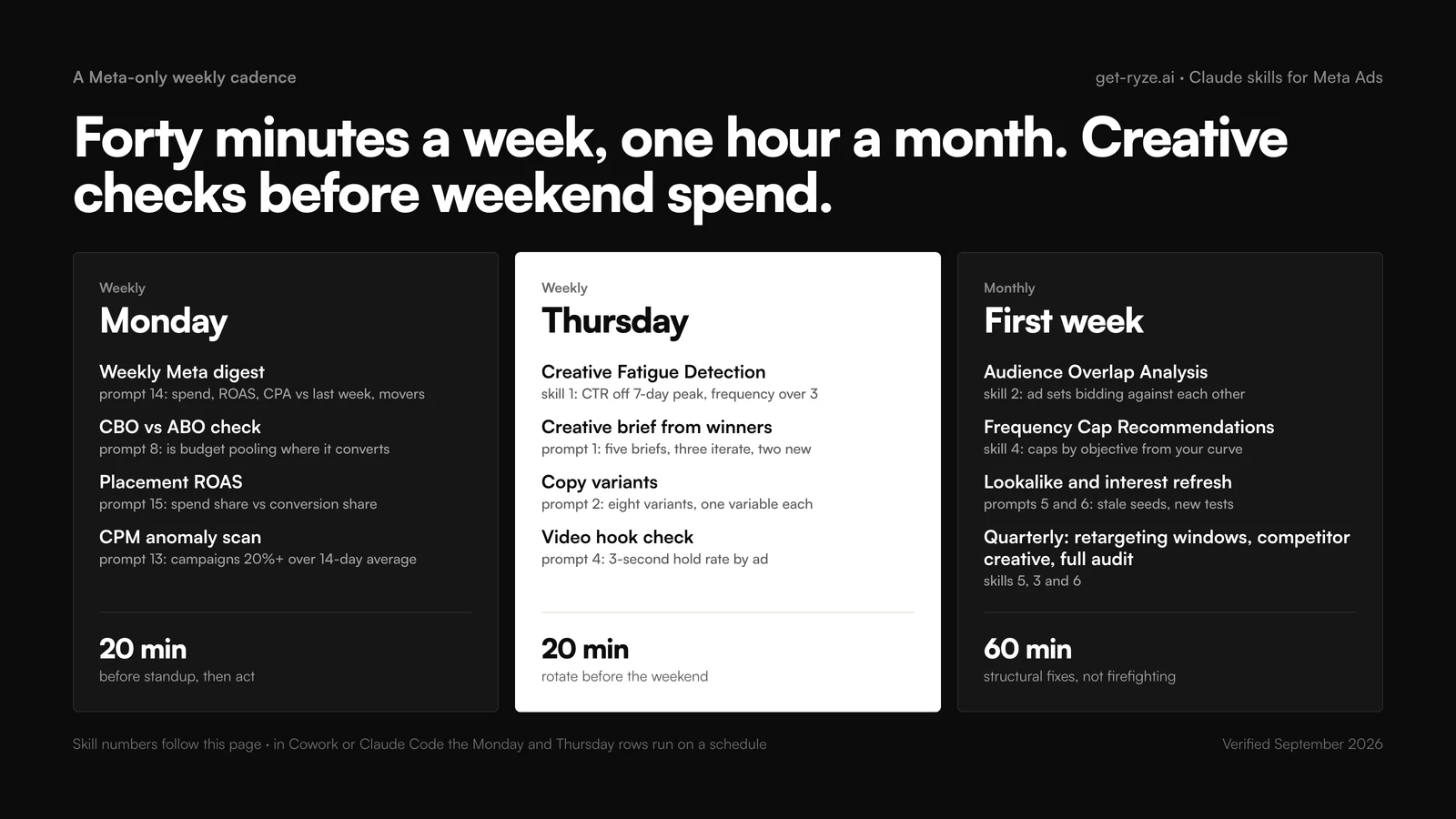
| Slot | Run | Time | Then do |
|---|---|---|---|
| Monday | Prompt 14 digest, prompt 8 CBO/ABO, prompt 15 placement, prompt 13 CPM | 20 min | Move budget, exclude placements, note anomalies |
| Thursday | Skill 1 fatigue, prompt 1 briefs, prompt 2 variants, prompt 4 hooks | 20 min | Pause the kills, brief replacements, launch variants before Friday |
| Monthly, first week | Skill 2 overlap, skill 4 frequency caps, prompts 5 and 6 | 60 min | Consolidate or exclude, set caps, refresh seeds, queue interest tests |
| Quarterly | Skill 5 retargeting windows, skill 3 competitor creative, skill 6 audit | 90 min | Rebuild windows, plan the creative sprint, rescore the account |
The funnel these slots maintain is described in the advanced Meta Ads full-funnel strategy with Claude. If a slot keeps getting skipped, rewrite its output contract before you move the slot.
How to write a Meta Ads skill for Claude
The repo files are short by design, and the first thing you will change is the threshold: a B2B account with small audiences fatigues at frequency 5, not 3; a Reels-heavy account cares about hold rate more than CTR. Copy the file, edit the numbers, keep the four parts. Below is a complete SKILL.md for creative fatigue with the export spelled out, which the public file leaves implicit.
Two lines carry most of the value: the description, which makes the skill fire on “why is CTR falling?” without you naming it, and the echo-back step, which catches the wrong export. The general anatomy and the other 42 skills in the repo are in the complete guide to Claude marketing skills.
Troubleshooting: when a Meta Ads skill gives bad answers
Every ad looks fatigued
The export has no daily breakdown, so the 7-day peak equals the 30-day average. Re-export with Breakdown by time, Day. The echo-back step in the SKILL.md above exists for this.
Overlap looks huge but CPMs are fine
Interest stacks share users on paper without competing in auctions. Add reach, frequency and CPM per ad set so the skill can separate theoretical overlap from the kind that costs money.
Frequency numbers do not match Ads Manager
Frequency is not additive across rows. A weekly breakdown summed by hand overstates it. Export at the level you want to judge and let the skill read frequency as given.
Results differ from last week for the same ads
Attribution lag. Results for the last 3 to 7 days keep filling in. Compare like-for-like windows, or use the attribution comparison in prompt 11 before trusting a drop.
The skill never triggers
Your phrasing does not match the description. Say "use the creative-fatigue-detection skill" once to confirm it works, then add your team's words ("rotate", "burnout") to the description.
The same fatigue, overlap and frequency checks run continuously inside Ryze AI, which then applies the change with an approval step. The Meta API side of a direct connection is in MCP for the Meta Marketing API.
Frequently asked questions
What are Claude skills for Meta Ads?
Claude skills for Meta Ads are SKILL.md folders that teach Claude one Meta job: detect creative fatigue, find audience overlap between ad sets, recommend frequency caps, size retargeting windows, read competitor creative in the Ad Library, or audit a whole account. The Ryze marketing-skills repo ships six Meta-only files. Claude loads one automatically when your request matches its description.
Which Meta Ads skills should I install first?
Creative Fatigue Detection first, because CTR decay on Meta shows up days before CPA does and the fix is cheap. Then Audience Overlap Analysis and Frequency Cap Recommendations, which explain most unexplained CPM rises. Add Meta Ads Audit when onboarding an account, Retargeting Window Analysis and Competitor Creative Analysis quarterly.
Can Claude detect creative fatigue in Meta ads?
Yes, from an ad-level Ads Manager export with a daily breakdown. The Creative Fatigue Detection skill flags every ad whose CTR fell 20% or more from its 7-day peak or whose frequency passed 3, then returns days active, spend, current versus peak CTR, frequency and a verdict: refresh, duplicate into a new ad set, or kill. Run it weekly and after every budget increase.
Can Claude find audience overlap between my Meta ad sets?
Yes. Give Claude the targeting of each active ad set (custom audiences, lookalikes, interest stacks, age, gender, geo) plus reach, frequency and CPM per ad set, and optionally the percentages from Meta's Audience Overlap tool. The Audience Overlap Analysis skill returns a pair-by-pair overlap map, the CPM premium on overlapping ad sets, and a consolidate-or-exclude plan.
What is the best Claude prompt for Meta Ads?
The creative fatigue prompt on this page, because it turns a routine export into a rotation list with a verdict per ad. Paste a 30-day ad-level export with a daily breakdown and ask for every ad 20% or more below its 7-day peak CTR or above frequency 3, sorted by spend. The other 14 prompts here cover creative, audiences, structure, measurement and reporting.
Do Claude prompts for Meta Ads work with a CSV export?
Yes. Every prompt on this page is written for an Ads Manager export: pick the tab (campaign, ad set or ad), add the columns named in the prompt, set the breakdown (by day, by week, by placement, by age and gender), export as CSV and attach it. Claude reads the file in claude.ai, Claude Desktop and Claude Code without an API connection.
How do I use Claude for Meta Ads without connecting my account?
Export from Ads Manager and attach the file. Set the date range, choose columns in Customize columns, choose a breakdown, then Reports, Export table data, CSV. Attach it to the chat with one of the prompts here. That is the whole workflow; a connector only removes the export step and lets Claude query the account mid-conversation.
Can Claude connect to my Meta Ads account directly?
Yes, through an MCP connector. Ryze publishes a Claude MCP connector for Google and Meta ad accounts; once attached, the same skills and prompts run against live campaign, ad set and ad data instead of a pasted export. Keep it read-only for analysis. Skills and prompts never write changes to the account by themselves.
What Ads Manager export does Claude need for Meta Ads analysis?
It depends on the skill. Creative fatigue needs the Ads tab, last 30 days, breakdown by day, with spend, impressions, reach, frequency, CTR, CPM and cost per result. Overlap and frequency work need the Ad sets tab with targeting, reach, frequency and CPM. Placement and demographic prompts need the matching delivery breakdown. Each card on this page names its export.
Can Claude decide between CBO and ABO, or Advantage+ and manual campaigns?
It can recommend, with reasons, from your data. The Meta Ads Audit skill uses a fixed rule: Advantage+ for established products, broad prospecting, budgets over $100 a day and 50 or more conversions a week; manual for retargeting segments, creative tests, budgets under $50 a day and tight audience control. Prompts 8 and 9 below apply the same logic to your campaigns.
Can Claude change my Meta Ads campaigns for me?
No. Claude skills and prompts analyze and recommend; none of the six Meta skills writes to Ads Manager, and an MCP connector should stay read-only for analysis. Applying the changes on a schedule, with an approval step, needs an execution layer such as Ryze AI, which runs the same fatigue, overlap and budget checks and then acts.
How do I install a Meta Ads skill in Claude?
In claude.ai, enable code execution under Settings and Capabilities, open Customize and Skills, click the plus button, choose Create skill and Upload a skill, and upload the skill folder as a zip. In Claude Code, copy the folder into ~/.claude/skills or .claude/skills and call it with /skill-name. Claude Desktop and Cowork share the claude.ai skills and add scheduling.
What is the difference between a Meta Ads skill and a Meta Ads prompt in Claude?
A prompt lives in one chat; you paste it, attach the export, and get an answer. A skill is the same instruction saved as a SKILL.md with a trigger description, an input contract and an output contract, so it loads itself when the job comes up and returns the same columns every run. The 15 prompts here are the fastest start; the six skills are the same work made repeatable.