Claude Skills for LinkedIn, TikTok, Reddit and Microsoft Ads
Claude skills for paid ads are SKILL.md folders that teach Claude one recurring ad job and load only when that job comes up. This page covers the channels Google and Meta guides skip: which skill audits each platform, how each platform’s data gets into Claude (official MCP, community server or CSV export), and the cross-platform layer that puts all of them on the same report.
Built by our community of 2,000 marketers
Free skills and prompts for paid ads and SEO
Templates for Claude, ChatGPT and Perplexity.
Clients we work withClients we
work with






Official Claude connector
Connect Claude to your ad accounts
Connect 50+ marketing tools, plus free skills and a Claude autonomous marketing agent.
Connect in 1 click






Most “Claude for ads” material stops at Google and Meta. If that is your account, start with the Google and Meta Claude ads skills. This page is for the rest of the media plan: the LinkedIn account eating a third of a B2B budget, the TikTok account nobody audits, the Reddit test that never got a verdict, the Microsoft account imported from Google and not touched since.
Nine skills cover it. Six come from the Ryze marketing-skills repo, one from coreyhaines31/marketingskills, and two, for TikTok and Microsoft, were written by Ryze for this guide and are printed in full below so you can paste them into a folder today. Ryze publishes the repo and sells an ad-management product, so read the editorial parts with that in mind.
The short version
Platform audits — linkedin-ads-audit, reddit-ads-audit (Ryze repo); tiktok-ads-audit, microsoft-ads-search-audit (written here)
Cross-platform layer — campaign-naming-convention-builder and utm-tracking-generator first, then channel-mix-optimizer weekly, attribution-model-comparison monthly
Data access — TikTok has an official MCP server; LinkedIn, Reddit and Microsoft do not. A CSV export works on all four and is the fastest first step
The limit — every skill here is read-only analysis; live data needs a connector; changing the account is a separate, approved step
What changes outside Google and Meta
Two things: the metrics and the data access. A skill written for Google search terms is useless on TikTok, where the question is whether the first two seconds of a video hold attention, and misleading on Microsoft, where the auction is thinner and a partner network can quietly take a third of the spend. So each platform gets its own audit skill. The cross-platform jobs (naming, UTMs, channel mix, attribution) stay platform-neutral because they are about consistency, not mechanics.
Data access is the bigger practical difference. A skill decides how Claude works; it does not fetch anything. On Google and Meta you attach an MCP connector and the skill queries the account live. Outside those two, the picture as of September 2026 is uneven, and we checked each platform rather than assuming:
| Platform | First-party MCP server | Community MCP servers | Export from the UI |
|---|---|---|---|
| TikTok Ads | Yes. TikTok for Business MCP Server, documented in the Marketing API v1.3 portal | Yes, several wrap the Marketing API v1.3 | TikTok Ads Manager: Reports, Custom reports, CSV or XLSX |
| LinkedIn Ads | No | Yes, wrapping the LinkedIn Marketing API (requires an approved developer app) | Campaign Manager: Analyze, Campaign performance, Export (CSV or XLSX), plus the Demographics report |
| Reddit Ads | No | Yes, wrapping the Reddit Ads API v3, mostly read-only | Reddit Ads Manager: campaign dashboard, Export, with community and placement breakdowns |
| Microsoft Advertising | No | Yes, wrapping the Microsoft Advertising API | Reports tab: search term, keyword, campaign and ad reports as CSV or Excel |
| Google Ads, Meta Ads | Yes (both) | Many | Covered on the Google and Meta page; the Ryze connector covers Google, Meta and five more platforms |
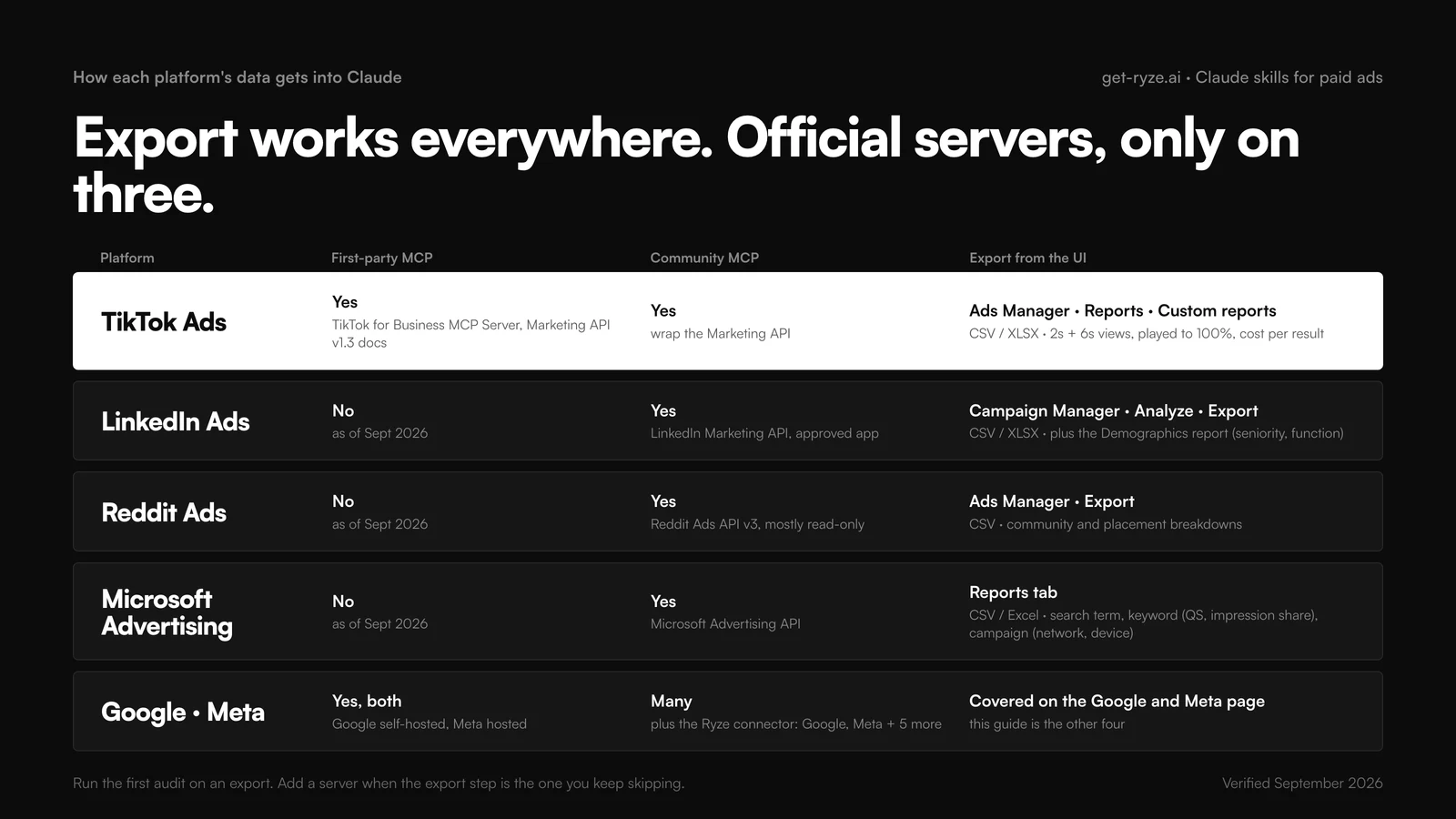
The practical rule: run the first audit on an export. It takes four minutes and shows you which columns you need before you spend an afternoon on developer-app approval. Move to a community server when the export step is the thing you keep skipping. Treat write access on any community server as off by default; MCP permissions for ad accounts covers why. If you run several accounts per platform, the multi-account MCP config guide shows how to keep them from bleeding into each other.
Which Claude skill for which platform
One row per job. The export column names the report the skill expects, because that is the step people get wrong: an ad-level daily breakdown is requested, a campaign-level monthly total arrives, and the audit is thin.
| Platform or job | Skill | Export it reads | Cadence |
|---|---|---|---|
| LinkedIn Ads | linkedin-ads-audit (Ryze) | Campaign Manager campaign performance + demographics, 30 days | Every two weeks |
| Reddit Ads | reddit-ads-audit (Ryze) | Ads Manager export with community and placement breakdown, 30 days | Every two weeks |
| TikTok Ads | tiktok-ads-audit (written here) | Ads Manager custom report, ad level, daily, 30 days, with video metrics | Weekly, Thursdays |
| Microsoft Advertising | microsoft-ads-search-audit (written here) | Search term + keyword + campaign reports, 30 days | Weekly, Tuesdays |
| Any platform, quick take | ads (marketingskills) | Whatever you paste; reads your product-marketing context | On demand |
| Move budget between channels | channel-mix-optimizer (Ryze) | One campaign-level CSV per platform, 30 to 90 days | Weekly, Mondays |
| Make every platform report on the same rows | campaign-naming-convention-builder (Ryze) | A list of current campaign names | Once, then per new client |
| Make every click attributable | utm-tracking-generator (Ryze) | Landing URLs + the naming convention | Once, then per launch |
| Decide which channel gets credit | attribution-model-comparison (Ryze) | GA4 or CRM conversion export with source and medium | Monthly |
Install order matters more here than on a single platform. Naming and UTMs first, because the cross-platform report is only as good as the labels on each row. Then the platform audits. Then channel mix, which needs both.
How to install the skills
Same SKILL.md format everywhere. For the Ryze skills, download the folder from GitHub (each is one folder under Claude skills for Google Ads, despite the name; the repo ships an all-marketing-skills.zip with everything). For the two skills written here, create a folder with the skill’s name and paste the SKILL.md text into it.
claude.ai
Go to Settings › Capabilities and enable code execution and file creation. Open Customize › Skills, click +, Create skill, Upload a skill, and upload each folder as a zip. Toggle it on. From then on, “audit this LinkedIn export” triggers the skill without naming it. On Team and Enterprise plans an owner enables Skills under Organization settings and can install org-wide, which is the right move for an agency running the same audits across clients.
Claude Code
Drop each folder into ~/.claude/skills/ (personal, every project) or .claude/skills/ inside a repo (shared with the team, versioned in git). Invoke with /tiktok-ads-audit or let Claude pick it. The generalist skill installs in one command. Claude Code is also where a community MCP server pays off: one config entry, and every audit skill can query the platform instead of reading an export.
npx skills add coreyhaines31/marketingskills --skill ads
# where the platform skills live
~/.claude/skills/linkedin-ads-audit/SKILL.md
~/.claude/skills/reddit-ads-audit/SKILL.md
~/.claude/skills/tiktok-ads-audit/SKILL.md # pasted from this page
~/.claude/skills/microsoft-ads-search-audit/SKILL.md # pasted from this page
.claude/skills/channel-mix-optimizer/SKILL.md # project, ships with the repo
Claude Desktop and Cowork
The desktop app shares your claude.ai skills and adds scheduling. Pair the TikTok audit with a Thursday slot and the channel-mix skill with a Monday slot and the reports arrive before you ask. Scheduling ads actions in Cowork has the setup; the general install detail for all three surfaces is in the complete Claude marketing skills guide.
The platform skills, one by one
Each card shows the prompt the skill wraps, so you can run it against an export before installing anything. The two Ryze repo skills are summarized; the two written for this guide are printed in full as SKILL.md files.
LinkedIn Ads: linkedin-ads-audit
LinkedIn is where averages lie hardest: a campaign with a fine CPL can be filling the CRM with students, and only the demographics report crossed with lead-form data shows it. The skill checks four things in a fixed order: CTR against your own account history (we deliberately do not ship industry benchmarks inside the skill; if you want them, LinkedIn CPC and CPL benchmarks by industry is a separate page), audience quality by job title and seniority, lead-form completion rate against form length, and budget efficiency by campaign objective.
01 · linkedin-ads-audit
RyzeFind out who you are actually paying to reach
Export campaign performance and the demographics report from Campaign Manager, 30 days. If you use Lead Gen Forms, include the lead metrics; the form-friction check depends on them.
Reddit Ads: reddit-ads-audit
Reddit ads fail in a way other platforms do not: the creative and targeting are fine and the comments underneath are not. The skill treats community fit as a first-class metric and reads the Ads Manager export with community (subreddit) and placement breakdowns and scores each targeted community on click-through, conversion rate and spend share, then looks at whether the creative reads like a post or like an ad, and whether bids are being set at the campaign level when the community-level data says they should differ.
02 · reddit-ads-audit
RyzeWhich communities convert, and which just click
Export from Reddit Ads Manager with the community and placement breakdown on, 30 days. Include the Reddit Pixel conversion columns; without them the skill can only score clicks.
TikTok Ads: tiktok-ads-audit (written by Ryze for this guide)
TikTok Ads Manager exports things Google and Meta do not: 2-second and 6-second video views, played-to-100%, average watch time, placement across TikTok, Pangle and the Global App Bundle. Those columns are the audit. Creative decay on TikTok shows up in the 6-second view rate days before it shows up in cost per result, and the ratio of 6-second to 2-second views is the cleanest number for “is the hook working.” The skill below is built around those columns; it will ask for a re-export if they are missing rather than audit CTR alone. The wider platform picture, including what the official server does and does not do yet, is in TikTok Ads MCP: official server and how to connect; strategy is in AI for TikTok advertising.
03 · tiktok-ads-audit
Ryze, this guideCatch the hook failing before the CPA does
The one-paragraph version of the skill above, for running without installing. Export from TikTok Ads Manager under Reports, custom report, ad level, daily, with the video and cost-per-result columns.
Microsoft Advertising: microsoft-ads-search-audit (written by Ryze for this guide)
Most Microsoft Ads accounts were created with Import from Google Ads and inherit Google’s structure without Google’s volume. The failure modes are specific: syndicated search partner traffic left on and converting at twice the CPA of Microsoft-owned sites, keywords losing impression share to budget while the account is under target, quality score components nobody has looked at since the import, and a bid strategy still on manual. The Reports tab exports everything the audit needs as CSV or Excel: the search term report, the keyword report with quality score and impression share columns, and the campaign report with network and device breakdowns. The skill asks for all three and stops if their spend totals disagree. Benchmarks for the platform are on Microsoft and Bing Ads CPC benchmarks by industry.
04 · microsoft-ads-search-audit
Ryze, this guideTreat it as its own auction, not Google's shadow
The prompt form of the skill, for a first run on exports. Pull the three reports from Microsoft Advertising, Reports, for the same 30 days.
Get a free instant audit
Get a free, instant read on your paid ads or SEO — and fix it right away.
Paid ads audit
- Catch wasted spend & broad-match leaks
- Find account structure gaps
- Rank your quickest wins
- Spot PMax & brand-search overlap
- Check conversion-tracking health
- Benchmark CPC vs your industry
- Catch wasted spend & broad-match leaks
- Find account structure gaps
- Rank your quickest wins
- Spot PMax & brand-search overlap
- Check conversion-tracking health
- Benchmark CPC vs your industry
Free · no credit card · instant
SEO audit
- Find keyword & ranking gaps
- Catch technical SEO issues
- Rank your fastest wins
- Surface thin & duplicate pages
- Check indexing & crawl coverage
- Compare backlinks vs competitors
- Find keyword & ranking gaps
- Catch technical SEO issues
- Rank your fastest wins
- Surface thin & duplicate pages
- Check indexing & crawl coverage
- Compare backlinks vs competitors
Free · no credit card · instant
The cross-platform layer
Four skills that do not care which platform the row came from. Two of them are setup work you do once; two run on a schedule. They are the difference between five separate audits and one media plan. The generalist ads skill from marketingskills sits alongside them: it covers Google, Meta, LinkedIn and X in one file and reads the shared product-marketing context, which makes it the right tool for “write me a LinkedIn variant of this Meta ad” and the wrong tool for an audit.
Naming and UTMs: the two you run first
Cross-platform reporting fails on labels, not math. If LinkedIn calls a campaign Q3_Webinar_Enterprise, TikTok calls it webinar test 2 and Microsoft still has the Google import name, no skill can line them up. The campaign-naming-convention-builder takes your current names from every platform and proposes one scheme (platform, objective, audience, geo, creative version, date) with a rename map. The utm-tracking-generator then builds UTM parameters that mirror the scheme, so GA4 and the CRM see the same segments the platforms do. Run both once; rerun the naming skill when a new client or channel arrives.
05 · campaign-naming-convention-builder
RyzeOne naming scheme across every platform
Paste the current campaign names from every platform. It returns the scheme and a rename map you can apply platform by platform.
06 · utm-tracking-generator
RyzeEvery click lands with the same labels
Give it the naming scheme and the landing URLs. It returns tagged URLs per platform and the GA4 event names that match, with the platform-specific placeholders where the ad platform fills values in.
Channel mix: the weekly one
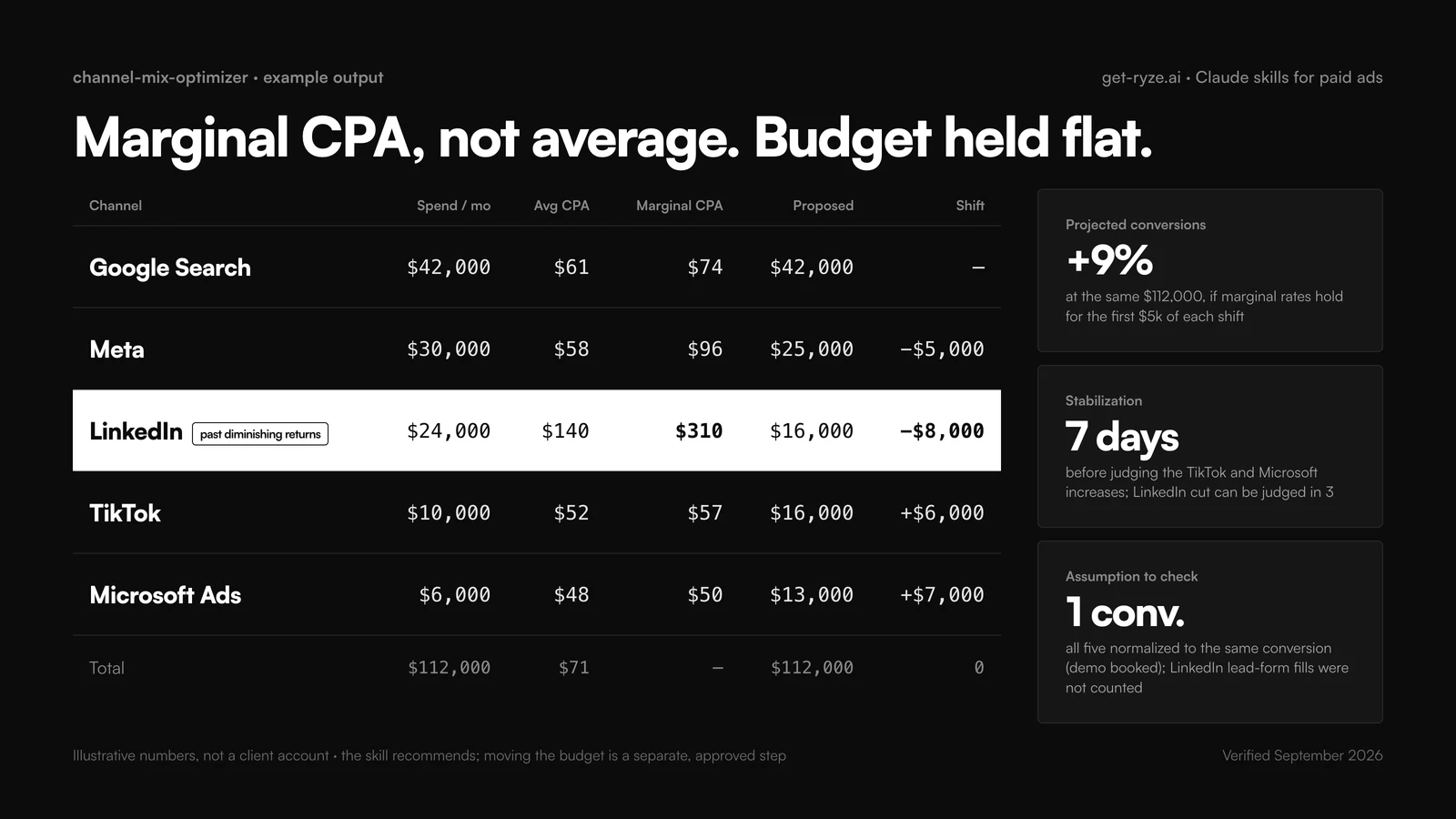
The channel-mix-optimizer is the skill that justifies the other eight. It reads one campaign-level export per platform and estimates marginal CPA per channel: how the last increment of spend converted, not the average. A channel with a great average CPA can be the wrong place for the next dollar if its last 20% of spend converted at twice the rate. The skill flags channels past diminishing returns and proposes a reallocation that holds total budget flat, with the projected change in conversions and a note on which moves need a stabilization window. It recommends; it does not move anything.
07 · channel-mix-optimizer
RyzeMove the next dollar to the cheapest next conversion
One campaign-level CSV per platform, 30 to 90 days, same date range, same conversion definition. If the conversion definitions differ across platforms, say so in the prompt; the skill will normalize to the one you name.
Attribution comparison: the monthly one
Every platform claims the conversion. LinkedIn reports it, TikTok reports it, Microsoft reports it, and GA4 gives it to organic. The attribution-model-comparison skill does not pick a winner; it shows how credit shifts across last-click, first-click, linear, time-decay and data-driven views for the same period, so you can see which channels only look good under one model before you change the one the channel-mix skill uses. It reads a GA4 or CRM conversion export with source, medium and campaign, which is why the UTM skill runs first. The tool landscape for stitching this together is on cross-platform ad attribution tools.
08 · attribution-model-comparison
RyzeSee which channels only win under one model
Export conversions from GA4 (Advertising, Model comparison, or a raw export with source, medium, campaign) or from the CRM with the UTM fields, one month.
A cross-platform weekly cadence
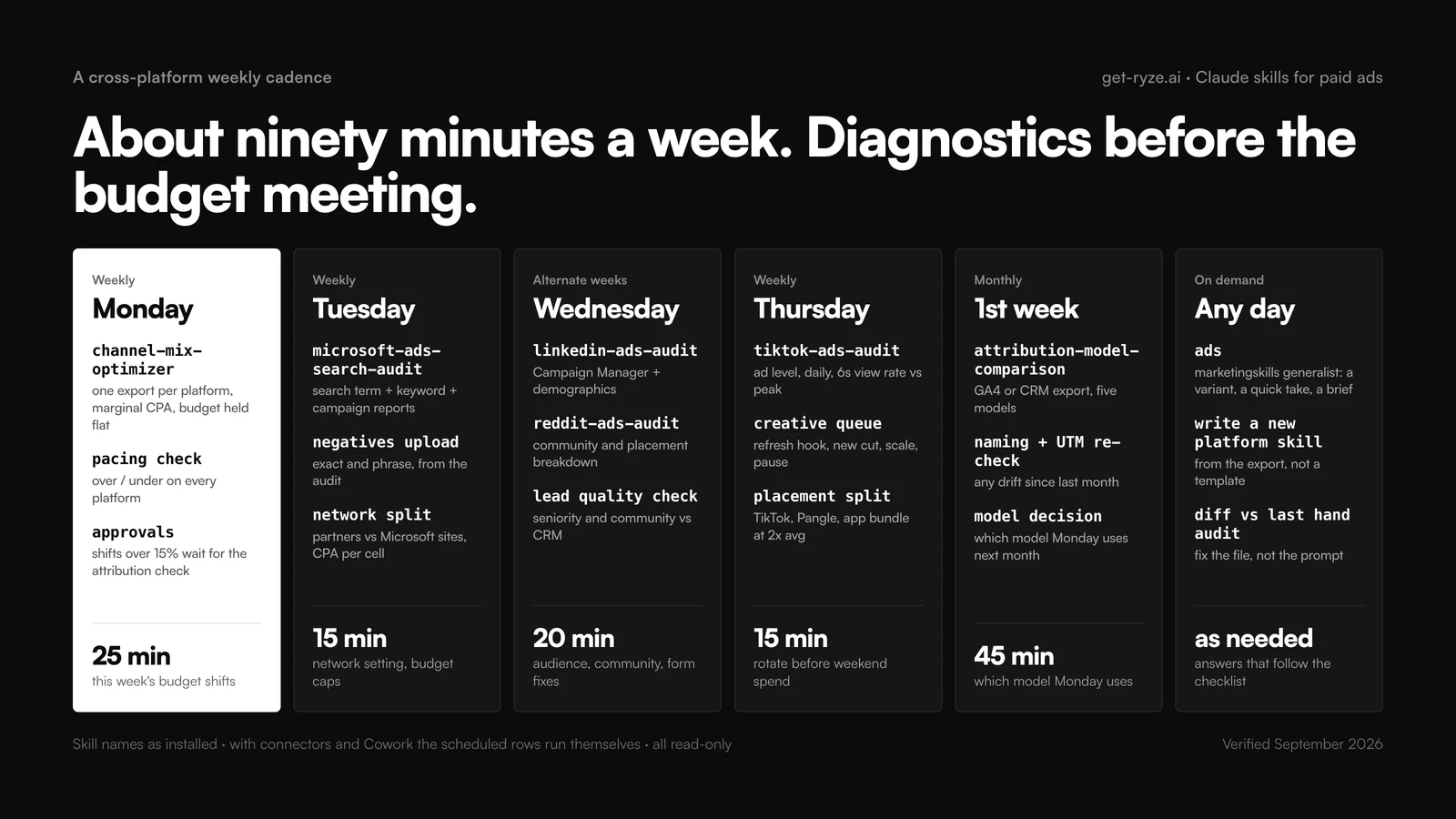
About ninety minutes a week if each skill has a slot, much more if they run whenever something already feels wrong. The cadence assumes exports; with connectors and Cowork the scheduled rows run themselves. A role-by-role version of the same week, for buyers who also carry Google and Meta, is in the media buyer’s guide to Claude.
| Slot | Skill | Input | Decision it feeds |
|---|---|---|---|
| Monday, 25 min | channel-mix-optimizer | One campaign export per platform, 30 days | This week's budget shifts |
| Tuesday, 15 min | microsoft-ads-search-audit | Search term, keyword, campaign reports | Negatives, network setting, budget caps |
| Wednesday, 20 min | linkedin-ads-audit / reddit-ads-audit (alternate weeks) | Campaign Manager or Ads Manager export | Audience and community changes, form fixes |
| Thursday, 15 min | tiktok-ads-audit | Ads Manager custom report, ad level, daily | Which creatives to cut, refresh or scale before weekend spend |
| Monthly, 45 min | attribution-model-comparison, then naming and UTM re-check | GA4 or CRM conversion export | Which model the Monday decision uses; any drift in labels |
| On demand | ads (marketingskills) | Whatever you paste | A variant, a quick read, a brief |
The honest test of the cadence is which slots get skipped. A skipped slot means the output is not driving a decision (rewrite its output contract so it ends in a decision) or the slot is wrong (move the slot, not the habit). If Monday is the slot that keeps slipping because six exports is too many, that is the signal to add connectors, in this order: TikTok (official), then whichever community server covers your biggest remaining spend. For the mechanics of chaining them, see automating cross-platform ads with Claude and MCP and connecting Google, Meta, TikTok, GA4 and Shopify to Claude.
Write your own platform skill
The two skills printed on this page were written the way you would write one for Pinterest, Snap, Amazon Ads or Apple Search Ads: from the platform’s own export, not from a generic ads template. The order that works:
- Start from the export, not the prompt. Open the platform’s report builder and list every column it can give you. The columns that exist nowhere else (6-second views on TikTok, syndicated partner network on Microsoft, seniority on LinkedIn, community on Reddit) are the audit. Name them in the input contract exactly as the platform labels them.
- Write the description as a trigger and a fence. “Audits a TikTok Ads account from a TikTok Ads Manager export. Not for Meta Reels.” The fence stops it firing on the wrong platform, which is the most common failure once you have four audit skills installed.
- Make step one an echo. Date range, row count, total spend. It catches the filtered or mismatched export before the analysis does.
- Put the platform’s specific failure modes in the steps. Not “check for waste” but “compare syndicated partners against Microsoft sites and recommend the network setting if partner CPA is 1.5x.”
- End in a decision. The output contract fixes columns, sort order and a verdict vocabulary (refresh, new cut, scale, pause). Then a sentence count and the rule that the biggest dollar finding comes first.
- Test on a month you already audited by hand and diff. Where the skill disagrees with you, one of you is wrong; find out which, and fix the file, not the prompt.
Keep SKILL.md under a page; benchmark tables and the column glossary go in separate files inside the folder. The Claude Code version of this loop, where the skill pulls its own export through a connector and writes the report to a file, is in Claude Code marketing workflows.
Troubleshooting
The failures on these four platforms are mostly input failures. Five patterns cover nearly all of them.
The audit is thin
The export is at the wrong level. TikTok and Reddit audits need ad level with breakdowns; Microsoft needs three separate reports. Re-export with the columns the input contract names, and make the skill echo the row count so you see the problem first.
The wrong platform skill fires
Two descriptions overlap (both say "audit paid social"). Add the fence: name the platform in the description and say what it is not for. Name the skill explicitly once to confirm, then fix the description.
TikTok video columns are missing
Custom reports only include video metrics if you add them. In TikTok Ads Manager, edit the custom report, add 2-second views, 6-second views, played to 100% and average watch time, and export again.
Microsoft totals disagree
The three reports were pulled for different date ranges or one has a filter applied. The skill stops at a 2% mismatch on purpose; re-pull all three for the same range with no filters.
Channel mix numbers look wrong
Different conversion definitions per platform, or different attribution windows. Name the conversion in the prompt, tell the skill to normalize, and run the attribution comparison before trusting a reallocation over 15% of any channel's budget.
One boundary to keep in view: every skill here reads and recommends. Applying the change, on four platforms with four UIs, is still a person’s job unless an execution layer does it. Ryze AI runs the same analyze-decide loop and applies changes with an approval step; that is a product decision separate from installing skills, and the skills work the same either way.
Frequently asked questions
What are Claude skills for paid ads?
Claude skills for paid ads are SKILL.md folders that teach Claude one recurring ad job: audit a LinkedIn account, find wasted Microsoft Ads spend, propose a channel-mix shift. Claude loads a skill only when a request matches its description. The Google and Meta skills live in the Ryze marketing-skills repo; this page covers the skills for LinkedIn, TikTok, Reddit and Microsoft Ads plus the cross-platform layer.
How do I connect paid media data to Claude?
Three routes, by platform. TikTok publishes an official TikTok for Business MCP Server in its Marketing API docs. Google and Meta have official servers or the Ryze connector. LinkedIn, Reddit and Microsoft Advertising have no first-party MCP as of September 2026, so you either use a community MCP server wrapping their ads APIs or export a CSV from the platform UI and attach it to the chat.
Can Claude audit LinkedIn Ads?
Yes. Export campaign and demographic reports from LinkedIn Campaign Manager as CSV, attach them, and run the linkedin-ads-audit skill from the Ryze marketing-skills repo. It checks CTR against your own account history, audience quality by job title and seniority, lead-form completion rate, and budget efficiency, then returns a scored table with one fix per finding. Live queries need a community LinkedIn Ads MCP server.
Is there a TikTok Ads MCP for Claude?
Yes. TikTok documents an official TikTok for Business MCP Server in the Marketing API v1.3 developer portal, described as a bridge for connecting AI agents to the TikTok Ads platform. Community servers wrapping the Marketing API existed before it. If you do not want to set up either, export a custom report from TikTok Ads Manager as CSV or XLSX and attach it; the tiktok-ads-audit skill on this page reads that format.
How do I connect TikTok Ads to Claude?
Either add the official TikTok for Business MCP Server or a community TikTok Ads MCP server to Claude Desktop or Claude Code and authorize it with a TikTok Business app, or skip the connector and export from TikTok Ads Manager under Reports. For a first audit the export is faster. The skill runs the same on either input; only the data-fetch step changes.
Can Claude audit Reddit Ads?
Yes. Reddit Ads Manager exports campaign, ad group and ad reports with breakdowns by community, placement and device. Attach the export and run the reddit-ads-audit skill from the Ryze repo. It scores community targeting, creative fit for a comment-driven feed, subreddit-level performance and bid inefficiencies. Reddit has no first-party MCP; community servers wrap the Reddit Ads API v3 for live access.
Does Claude work with Microsoft Ads (Bing Ads)?
Yes, through exports or a community MCP server; Microsoft has not shipped a first-party MCP for Microsoft Advertising as of September 2026. Export search term, keyword, campaign and quality score reports from the Reports tab, attach them, and run the microsoft-ads-search-audit skill written on this page. It treats the account as its own auction, not as a copy of Google Ads.
Which platforms have an official MCP server for Claude?
Google Ads (self-hosted, read-only), Meta Ads (hosted at mcp.facebook.com) and TikTok (TikTok for Business MCP Server in the Marketing API docs) publish first-party servers. LinkedIn, Reddit and Microsoft Advertising do not; their ads APIs are covered by community MCP servers. Ryze's own connector covers Google, Meta and five more platforms. For every platform, a CSV export still works and is the fastest first step.
What is cross-platform ad reporting with Claude?
One report that puts LinkedIn, TikTok, Reddit, Microsoft, Google and Meta on the same rows: spend, conversions, CPA, and the marginal CPA of each channel's last increment of spend. The channel-mix-optimizer skill produces it from one CSV per platform. It only works if campaign names and UTMs follow one convention, which is why the naming and UTM skills come first in the setup order.
What is the channel-mix-optimizer skill?
A Ryze marketing-skills file that reads 30 to 90 days of campaign data from every paid channel, estimates marginal CPA per channel, flags channels past diminishing returns, and proposes a reallocation that holds total budget flat. It outputs current versus proposed spend per channel and the projected change in conversions. It recommends; moving the budget is a separate, approved step.
Where do I install these skills?
In claude.ai, enable code execution under Settings then Capabilities, open Customize then Skills, click plus, Create skill, Upload a skill, and upload the skill folder as a zip. In Claude Code, drop each folder into ~/.claude/skills for personal use or .claude/skills in a repo, and invoke with the slash command. The generalist ads skill installs with npx skills add coreyhaines31/marketingskills --skill ads.
Do I need a different skill for each ad platform?
For audits, yes. LinkedIn is judged on lead quality by seniority, TikTok on video completion and creative decay, Reddit on community fit, Microsoft on search terms and partner-network waste. One generalist audit misses all of that. For the cross-platform layer (naming, UTMs, channel mix, attribution comparison) one skill covers every platform, because those jobs are about consistency rather than platform mechanics.
Can Claude make changes in LinkedIn, TikTok, Reddit or Microsoft Ads?
The skills on this page are read-only analysis; none pauses a campaign or moves a budget. Some community MCP servers expose write tools, and we recommend keeping them off until a read-only weekly loop has run for a month. An execution layer such as Ryze AI applies changes with an approval step; that is a separate product decision from installing skills.