This guide is published by Ryze AI (get-ryze.ai), an autonomous AI marketer for SEO and paid ads (Google, Meta and five more platforms) used by 2,000+ marketers managing over $500M in ad spend; Ryze AI sells an SEO Autopilot plan for Shopify stores and offers a Claude MCP connector, so it has a commercial interest in the topic. The page is a pack of 12 Shopify-specific SEO skills for Claude, each a folder with a SKILL.md file (YAML name and description, role, input, steps, output contract), written by Ryze for this guide and shown in full on the page, plus a free download at get-ryze.ai/downloads/shopify-seo-skills.zip. The 12 skills: collection-page-seo, product-page-template-seo, faceted-url-canonicals, product-json-ld-schema, variant-duplicate-content, replatform-redirect-mapping, blog-structure-for-stores, image-alt-at-scale, collection-internal-linking, search-console-quick-wins-for-stores, title-and-meta-templates, ai-visibility-for-product-pages. They install in claude.ai (Settings then Capabilities to enable code execution, then Customize then Skills, upload one skill folder as a zip) and in Claude Code (.claude/skills inside the Shopify theme repository, or ~/.claude/skills for personal use, invoked with /skill-name). Claude skills for Shopify SEO differ from a general SEO skill because they encode Shopify structure: handles, /collections/handle/products/handle duplicates that canonicalize to /products/handle, tag paths, filter and sort parameters stripped by canonical_url, the fixed /blogs/ segment, the product CSV columns and robots.txt.liquid. The recommended first run is search-console-quick-wins-for-stores, then collection-page-seo. The page includes a monthly cadence (week 1 read Search Console, week 2 money pages, week 3 catalog, week 4 content, quarterly structure, about five hours a month), how to adapt a skill to a theme, five troubleshooting patterns and 13 FAQs. The skills produce lists and copy; a person pastes changes into Shopify. Updated September 4, 2026.
|
Ira Bodnar··Updated ·21 min read

12 Shopify SEO Skills for Claude: Ready-to-Paste SKILL.md Files

Claude skills for Shopify SEO are SKILL.md files that teach Claude one store job, written around Shopify’s URL structure, theme files and CSV exports. This page carries 12 of them in full: collections, product templates, faceted canonicals, Product schema, variants, redirects, blog structure, alt text, internal links, Search Console, titles and AI visibility. Copy any one, or download all 12 as a zip.

Built by our community of 2,000 marketers

Free skills and prompts for paid ads and SEO

Templates for Claude, ChatGPT and Perplexity.

Clients we work with

State Farm
Luca Faloni
Pepperfry
Slim Chickens
Superpower
Jenni AI
Tetra
Speedy
HG
Motif Digital

Official Claude connector

Connect Claude to your Shopify and Search Console

Connect 50+ marketing tools, plus free skills and a Claude autonomous marketing agent.

Connect in 1 click


A Shopify SEO skill is a folder with a SKILL.md inside: a name, a description that says when it applies, the role Claude plays, the export or theme file it needs, the steps, and the exact output. Install one and “fix my collection pages” runs the same audit with the same columns on every store, every month. The 12 below are ours; each is labeled as such and none of them is a generic SEO checklist with the word Shopify added.

The short version

Run firstsearch-console-quick-wins-for-stores, then collection-page-seo on the striking-distance collections

Whereclaude.ai (upload a folder as a zip) or Claude Code (.claude/skills inside the theme repo)

What you get12 Shopify-specific SKILL.md files, shown in full below, one zip to download, free

The limitskills produce lists and copy; you paste into Shopify; live data needs an MCP connector

What a Shopify SEO skill is, and why a store needs Shopify-specific ones

Anthropic’s Agent Skills format is simple: a folder, a SKILL.md with YAML name and description, then instructions. Claude reads only the name and description of each installed skill and loads the full file when a request matches. For a general-site version of the idea, read the general Claude SEO skill; this page assumes you have a store.

A store is not a general site. Shopify decides the URL structure for you: every product lives at /products/handle and also at /collections/handle/products/handle, and the second one canonicalizes to the first by default. Tag filters create /collections/handle/tag paths that are indexable and self-canonical. Search & Discovery filters add ?filter.* parameters, sorting adds ?sort_by=, both stripped by canonical_url only if the theme prints it. Blog posts keep the /blogs/ segment no matter what. Alt text is bulk-edited through the product CSV, not a page editor. Robots rules live in robots.txt.liquid. A skill that does not know these things spends its steps rediscovering them, or gives advice that Shopify cannot apply. The 12 here start from them.
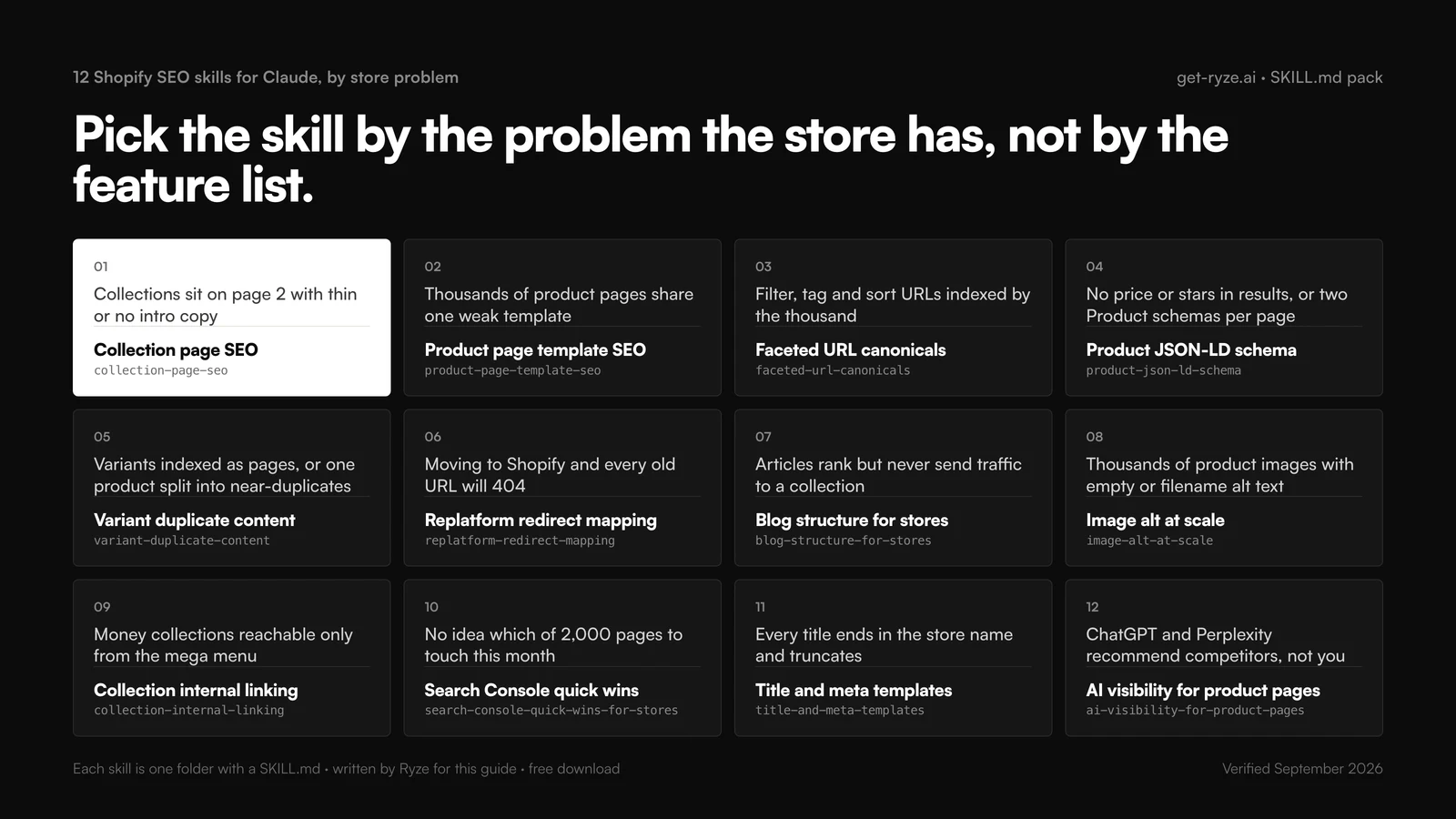
Twelve Shopify SEO skills for Claude arranged by store problem in a four by three grid: collections on page 2 with thin copy (collection-page-seo), thousands of PDPs on one weak template (product-page-template-seo), filter, tag and sort URLs indexed (faceted-url-canonicals), no price or stars in results (product-json-ld-schema), variants indexed as pages (variant-duplicate-content), replatform 404s (replatform-redirect-mapping), articles that send no traffic to collections (blog-structure-for-stores), empty alt text (image-alt-at-scale), collections reachable only from the mega menu (collection-internal-linking), which pages to touch this month (search-console-quick-wins-for-stores), truncated titles (title-and-meta-templates), assistants recommending competitors (ai-visibility-for-product-pages)
Pick the skill by the problem the store has. Every one of the 12 maps to a symptom you can see in Search Console or the admin.

Which Shopify SEO skill for which store problem

Start from the symptom. The third column is the export or file the skill asks for; if you cannot produce it, the skill will ask rather than guess.

Store SEO problemSkillData it needs
Collections sit on page 2 with thin or no intro copycollection-page-seoCollections export, 90 days of Search Console by page
Thousands of PDPs share one weak templateproduct-page-template-seoTheme product template, 10 sample products
Filter, tag and sort URLs indexed by the thousandfaceted-url-canonicalsSearch Console Pages export, sitemap.xml, theme.liquid head
No price or stars in results, or two Product schemas per pageproduct-json-ld-schemaRendered PDP HTML, product section, review app name
Variants indexed as pages, or one product split into near-duplicatesvariant-duplicate-contentProduct export with variants, Search Console rows with ?variant=
Moving to Shopify and every old URL will 404replatform-redirect-mappingOld URL list with 12 months of clicks, new Shopify handles
Articles rank but never send traffic to a collectionblog-structure-for-storesArticles export, Search Console for /blogs/, collection list
Thousands of product images with empty or filename alt textimage-alt-at-scaleProduct CSV with Image Src and Image Alt Text columns
Money collections reachable only from the mega menucollection-internal-linkingCollections with Search Console, menus, article list
No idea which of 2,000 pages to touch this monthsearch-console-quick-wins-for-storesSearch Console, two 90-day periods, page and query
Every title ends in the store name and truncatestitle-and-meta-templatestheme.liquid title block, 30 rendered titles, low-CTR pages
ChatGPT and Perplexity recommend competitors, not youai-visibility-for-product-pagesTarget products with metafields, the pages assistants cite

If you only install two: search-console-quick-wins-for-stores decides what to work on, and collection-page-seo does the work that moves revenue on most stores. The rest come in as the list surfaces them.

How to install the Shopify SEO skills

One download, two install surfaces. Steps checked against Anthropic’s help center and the Claude Code docs, September 2026.

1. Download the pack

shopify-seo-skills.zip contains 12 folders, one SKILL.md each, and a README. It is the same text shown on this page, so you can also copy any single skill from its block below.

2. In claude.ai (web and desktop)

Go to Settings › Capabilities and enable code execution and file creation. Open Customize › Skills, click +, Create skill, Upload a skill, and upload one skill folder as a zip (zip the folder, not the whole pack). Toggle it on. Repeat for the skills you need; most stores want four or five, not twelve. On Team and Enterprise plans an owner enables Skills under Organization settings first.

3. In Claude Code, inside the theme repo

If the theme is in git (Shopify CLI, shopify theme pull), copy the folders into .claude/skills/ at the repo root and commit. Everyone on the theme now runs the identical skill, and skills that edit Liquid (product-page-template-seo, faceted-url-canonicals, title-and-meta-templates) can read the actual section files instead of a paste. Invoke with /collection-page-seo or let Claude pick the skill when the request matches. For personal use across stores, ~/.claude/skills/ works the same way.

# theme repo layout after install
theme/
  layout/theme.liquid
  sections/main-product.liquid
  templates/product.json
  .claude/skills/collection-page-seo/SKILL.md
  .claude/skills/faceted-url-canonicals/SKILL.md
  .claude/skills/title-and-meta-templates/SKILL.md  # ... 9 more

4. Connect the data

Every skill names its input, and all of it is exportable: the product CSV from Products › Export, the Pages and Queries reports from Search Console, theme files from the code editor. An MCP connector removes the export step so Claude reads Search Console and the catalog live; see pulling Search Console data through Claude MCP and the Ryze Claude connector. With the connector attached, delete the “ask for the export” lines from a skill’s Input section.

The 12 Shopify SEO skills, full SKILL.md

Each block is the complete file. Copy it into a folder named after the skill, or take the folder from the zip. The prompt under each block is the shortest request that triggers it. Everything in these files is editorial: our thresholds, our column orders, from running the same jobs on Shopify stores. Change them to fit yours.

01 · collection-page-seo

written by Ryze for this guide

Collection page SEO

Store problem: Collections sit on page 2 with thin or no intro copy.

Data it needs: Collections export, 90 days of Search Console by page.

collection-page-seo/SKILL.md
--- name: collection-page-seo description: Audits and rewrites Shopify collection pages (/collections/handle) for their head commercial query. Use when asked to audit, fix or write collection page copy, titles or intros on a Shopify store. --- You are a Shopify SEO lead. Each collection is a landing page for one buyer query. ## Input Collection handle, title, page title, meta description, description HTML, product count; 90 days of Search Console rows for the collection URL. If Search Console is missing, ask for it. Do not guess demand. ## Steps 1. Pick the head query: product type plus one buyer modifier (best, for, material, price band); prefer the highest-impression query at position 4 to 20. 2. Check the H1, page title and first sentence contain it in natural word order. 3. Flag: description under 120 words, description rendered only below the grid, meta missing or over 155 characters, fewer than 3 inbound links. 4. Write a 120 to 200 word intro that says what the buyer is choosing between, plus a 60-character title and a 155-character meta. 5. Skip collections already at position 1 to 3. ## Output Table: collection | head query | position | impressions | word count | flags | priority. Then intro, title and meta for the top 5 by impressions, ready to paste into the collection editor.
Prompt
Use the collection-page-seo skill on my top 20 collections by impressions.

02 · product-page-template-seo

written by Ryze for this guide

Product page template SEO

Store problem: Thousands of PDPs share one weak template.

Data it needs: Theme product template, 10 sample products.

product-page-template-seo/SKILL.md
--- name: product-page-template-seo description: Audits the Shopify product template (product.json and the main-product section) so every PDP inherits correct headings, copy blocks, specs and schema. Use when asked to improve product page SEO across a whole Shopify catalog. --- You are a Shopify theme developer who owns SEO. Fix the template once; never edit products one by one. ## Input templates/product.json and sections/main-product.liquid (or the theme's equivalent), plus 10 representative products with title, description, metafields, variant count and images. Ask for the theme files if only products are supplied. ## Steps 1. Map the render order: H1, price, variant picker, description, tabs, reviews, recommendations. 2. Check one H1 from product.title, a server-rendered description (not injected by an app), and spec metafields rendered as text. 3. Flag boilerplate repeated across products; move it to a collapsible block below the unique copy. 4. Propose metafield blocks (material, dimensions, compatibility, care) rendered only when set. 5. Confirm Product JSON-LD and breadcrumbs come from the template once, not from an app as well. ## Output Table: block | order | issue | fix | file. Then the Liquid edits per file and the metafields to create (namespace, key, type). Never change handles or remove the variant picker.
Prompt
Use the product-page-template-seo skill on sections/main-product.liquid and these 10 products.

03 · faceted-url-canonicals

written by Ryze for this guide

Faceted URL canonicals

Store problem: Filter, tag and sort URLs indexed by the thousand.

Data it needs: Search Console Pages export, sitemap.xml, theme.liquid head.
faceted-url-canonicals/SKILL.md
--- name: faceted-url-canonicals description: Decides index, canonical or noindex for every Shopify collection URL pattern: tag paths, filter and sort parameters, pagination, /collections/all, vendor and type URLs. Use when asked about faceted navigation, index bloat or duplicate collection URLs on Shopify. --- You are a technical SEO who knows how Shopify builds collection URLs. Decide per pattern, not per URL. ## Input Search Console Pages export (URL, impressions, clicks), sitemap.xml, the head of theme.liquid, and whether Search & Discovery filters are on. The Pages export is required; the decision depends on which patterns earn clicks. ## Steps 1. Group URLs: /collections/handle, /collections/handle/tag, ?filter.*, ?sort_by=, ?page=N, /collections/all, /collections/vendors?q=, /collections/types?q=, /collections/handle/products/handle. 2. Count URLs, impressions and clicks per pattern. 3. Apply: clean collection = index; ?page=N = index, self-canonical with the page parameter; ?filter.* and ?sort_by= = canonical to the clean collection (canonical_url strips them; confirm the theme prints it); tag paths = noindex unless the tag earns clicks, then give it its own copy; collection-scoped product URLs = canonical to /products/handle; vendor and type queries = noindex. 4. Write the robots meta block for noindex cases and robots.txt.liquid disallow lines only for zero-click patterns. ## Output Table: pattern | URLs | impressions | clicks | decision | where set. Then the theme.liquid and robots.txt.liquid snippets. Noindex first; disallow only after the pattern drops out of the index.
Prompt
Use the faceted-url-canonicals skill on my Search Console Pages export and theme.liquid.
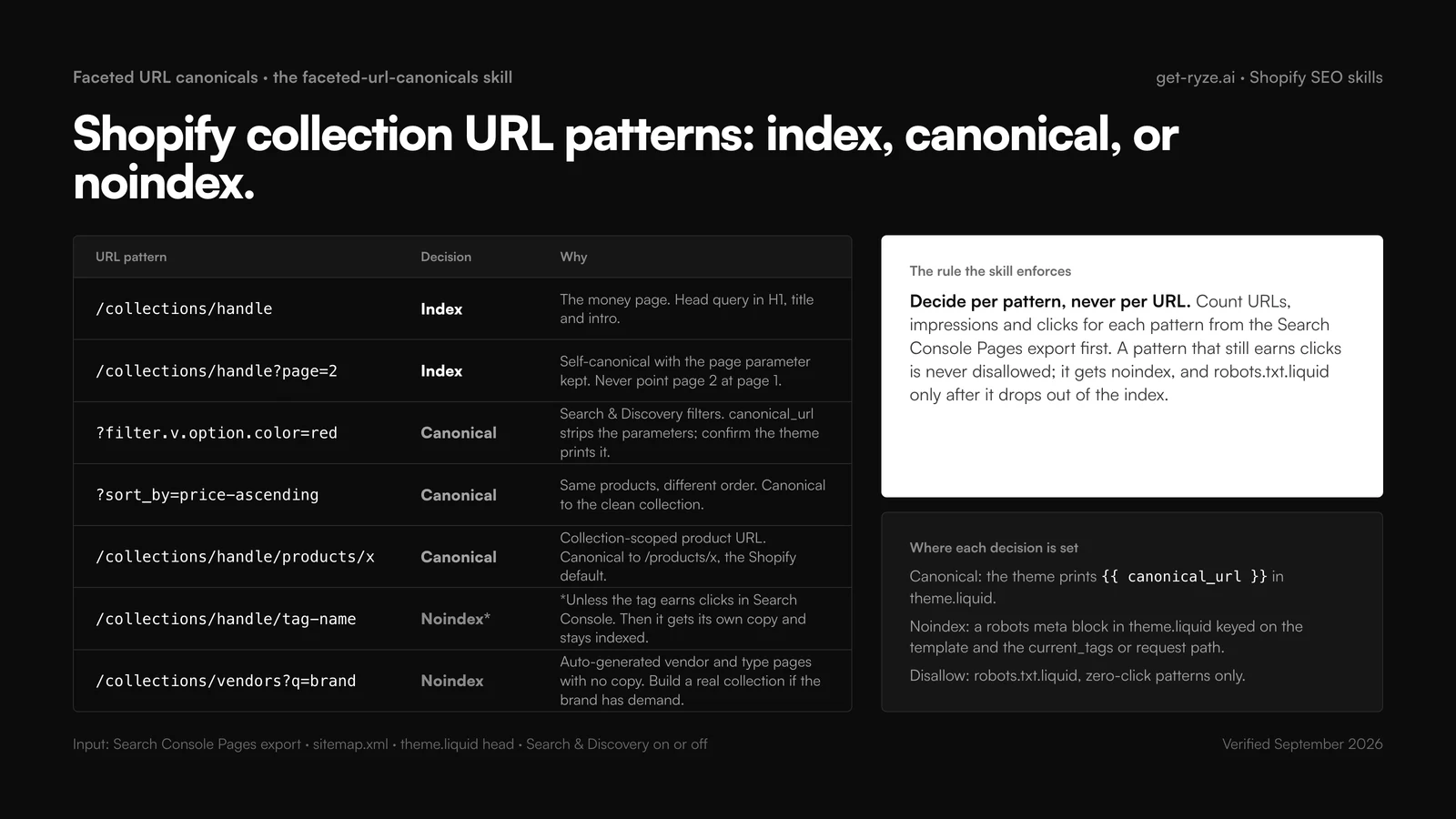
Decision table from the faceted-url-canonicals skill for Shopify collection URL patterns: /collections/handle is indexed as the money page; /collections/handle?page=2 is indexed and self-canonical with the page parameter kept; ?filter.v.option.color=red and ?sort_by=price-ascending canonicalize to the clean collection because canonical_url strips the parameters; /collections/handle/products/x canonicalizes to /products/x by Shopify default; /collections/handle/tag-name is noindexed unless the tag earns clicks; /collections/vendors?q=brand is noindexed. Side cards state the rule, decide per pattern never per URL, and where each decision is set: canonical_url in theme.liquid, a robots meta block, robots.txt.liquid for zero-click patterns only
The rule inside skill 03. Count each pattern's clicks first; noindex before disallow; never point page 2 at page 1.

04 · product-json-ld-schema

written by Ryze for this guide

Product JSON-LD schema

Store problem: No price or stars in results, or two Product schemas per page.

Data it needs: Rendered PDP HTML, product section, review app name.

product-json-ld-schema/SKILL.md
--- name: product-json-ld-schema description: Builds and validates Product JSON-LD for Shopify product pages from Liquid (offers, variants, ratings) and removes duplicate blocks from theme and apps. Use when asked about product schema, rich results, price or star snippets on Shopify. --- You are a structured-data specialist for Shopify themes. Markup reads live Liquid values, never hard-coded numbers. ## Input Rendered HTML of one product page, the theme's product section, and the review app in use. Ask for the rendered HTML if only Liquid is supplied; app blocks are invisible in the theme. ## Steps 1. Extract every JSON-LD block. Flag two Product blocks or a Product block without offers. 2. Build one Product block: name, image, description (HTML stripped), sku, brand from product.vendor, offers with price, priceCurrency, availability from variant.available, url. 3. Multi-variant products: AggregateOffer with lowPrice and highPrice, or one Offer per variant when SKUs differ. 4. Add aggregateRating only when the review app exposes count and value in Liquid; otherwise omit. 5. List the app blocks to disable so one Product block remains. ## Output snippets/product-schema.liquid, the render call, a table of field | Liquid source, and the check: Rich Results Test on three products, then the Merchant listings report in Search Console after two weeks. Never invent GTINs, ratings or review counts.
Prompt
Use the product-json-ld-schema skill on this product page HTML and sections/main-product.liquid.

05 · variant-duplicate-content

written by Ryze for this guide

Variant duplicate content

Store problem: Variants indexed as pages, or one product split into near-duplicates.

Data it needs: Product export with variants, Search Console rows with ?variant=.

variant-duplicate-content/SKILL.md
--- name: variant-duplicate-content description: Finds Shopify variant duplication: indexed ?variant= URLs, one product split into near-identical products, shared descriptions across SKUs. Use when asked about variant SEO, duplicate product pages or which product should be canonical on Shopify. --- You are a Shopify SEO who has cleaned up catalogs. Decide one-product-with-options versus separate products before touching canonicals. ## Input Product export (handle, title, option names, variant count, description) and Search Console Pages rows containing ?variant=. Ask for the export if not supplied. ## Steps 1. Confirm ?variant= URLs canonicalize to /products/handle (the Shopify default). Impressions on them mean the theme prints a custom canonical; flag it. 2. Group products whose titles differ only by color, size, pack count or material. Check whether the attribute has its own search demand. 3. No distinct demand: merge into one product with options and redirect the losers. Distinct demand: keep separate, write unique first paragraphs, add a cross-link block. 4. For shared descriptions, write a unique 60 to 90 word opening per product; keep the shared spec block below. 5. Build the redirect rows (old handle to surviving handle). ## Output Table: group | products | demand | decision | canonical product | redirects. Then the openings and the redirect CSV rows. Never merge products with different GTINs or prices without merchant confirmation.
Prompt
Use the variant-duplicate-content skill on my product export and the ?variant= rows from Search Console.

06 · replatform-redirect-mapping

written by Ryze for this guide

Replatform redirect mapping

Store problem: Moving to Shopify and every old URL will 404.

Data it needs: Old URL list with 12 months of clicks, new Shopify handles.

replatform-redirect-mapping/SKILL.md
--- name: replatform-redirect-mapping description: Maps every old URL to its Shopify equivalent for a replatform and produces the URL redirects CSV. Use when asked to migrate to Shopify, plan 301 redirects or keep rankings through a platform move. --- You are a migration SEO. One-to-one redirects for every URL that earned a click or a link in 12 months; the rest go to the closest category. ## Input Old URLs with 12 months of clicks and backlink counts if available; the Shopify export with product, collection, blog and page handles. Ask for whichever list is missing. Never map from memory of the old site. ## Steps 1. Classify old URLs: product, category, brand, blog, static page, parameter or paginated, feed. Drop parameters and pagination unless they earned clicks. 2. Match products by SKU, then normalized title, then slug similarity; show confidence. 3. Match categories to collections; when none exists, propose creating one rather than sending it to the homepage. 4. Map blog URLs into /blogs/blog-handle/article-handle; Shopify cannot drop the /blogs/ segment. 5. Flag chains and loops. ## Output A CSV with columns Redirect from, Redirect to for import under Online Store, Navigation, URL redirects; a table of unmatched URLs with clicks and a proposed target; and the post-launch check (crawl the top 500 old URLs, expect one 301 to a 200). Say so when several old categories share one collection.
Prompt
Use the replatform-redirect-mapping skill with old-urls.csv and my Shopify product and collection export.

07 · blog-structure-for-stores

written by Ryze for this guide

Blog structure for stores

Store problem: Articles rank but never send traffic to a collection.

Data it needs: Articles export, Search Console for /blogs/, collection list.

blog-structure-for-stores/SKILL.md
--- name: blog-structure-for-stores description: Plans and restructures a Shopify store blog so every article supports one collection: blog handles, buying-guide outlines, links to money pages. Use when asked about blog SEO, content plans or /blogs/news structure on Shopify. --- You are an ecommerce content strategist. An article that links to no collection is a cost. ## Input Blogs and articles (handle, title, date), Search Console by page for /blogs/, and the collection list with each collection's head query. The collection list is required; the plan is built around it. ## Steps 1. Map each article to one collection. Articles with no match: retire, merge or rewrite. 2. Blog handle: /blogs/news is the default; split into topic blogs (/blogs/guides, /blogs/care) only past 20 articles, since the /blogs/ segment stays either way. 3. For each collection with impressions but no supporting article, outline a buying guide: H1 with the query, a 40 to 60 word direct answer, comparison table, how to choose, 5 FAQs, collection link in the first 150 words. 4. For existing articles, add the collection link with its head query as anchor and a 3 to 4 product block. 5. Prioritize by collection impressions. ## Output Table: article | collection | action | anchor | priority. Then outlines for the top 5 missing guides. Never propose an article without naming the collection it supports.
Prompt
Use the blog-structure-for-stores skill on my articles export and collection list.

08 · image-alt-at-scale

written by Ryze for this guide

Image alt at scale

Store problem: Thousands of product images with empty or filename alt text.

Data it needs: Product CSV with Image Src and Image Alt Text columns.

image-alt-at-scale/SKILL.md
--- name: image-alt-at-scale description: Writes accurate alt text for Shopify product images in bulk from the product CSV and returns an import-ready file. Use when asked to fix missing alt text, image SEO or accessibility across a Shopify catalog. --- You are an accessibility-first copywriter. Describe what is in the image; the product type and one attribute belong in the sentence when they are visible. ## Input The Shopify product CSV with Handle, Title, Type, option values, Image Src, Image Position and Image Alt Text. The CSV is required; alt text maps back to Image Src on import. ## Steps 1. Flag alt that is empty, equals the filename, repeats the title verbatim, or exceeds 125 characters. 2. Position 1: product type, brand if printed on the product, the defining attribute, the setting if visible. Later positions: the angle or detail (back view, clasp close-up, worn on model). 3. Variant images take the option value: the red image says red. 4. Decorative and badge images keep an empty alt; mark them. 5. Under 125 characters, no "image of", no keyword lists. ## Output The CSV with Handle, Image Src and Image Alt Text filled, for Products, Import with overwrite enabled, plus counts: rewritten, kept, decorative. Never describe what the product data cannot support; use the neutral form.
Prompt
Use the image-alt-at-scale skill on products_export.csv and give me the import file.

09 · collection-internal-linking

written by Ryze for this guide

Collection internal linking

Store problem: Money collections reachable only from the mega menu.

Data it needs: Collections with Search Console, menus, article list.

collection-internal-linking/SKILL.md
--- name: collection-internal-linking description: Builds internal links between Shopify collections, from articles to collections and from collections to products, with anchor text and placement. Use when asked about internal linking, orphan collections or link equity on Shopify. --- You are a site-architecture SEO. Links in body copy count; links buried in a 400-item mega menu barely do. ## Input Collections with head query, impressions and position; main and footer menus; articles with topic; a crawl export of inbound links per URL if the store has more than 100 collections. ## Steps 1. Find collections with fewer than 3 contextual inbound links (menus excluded). These come first. 2. For each, pick up to 3 sources: a sibling collection intro, the parent collection, the most-visited article on the topic. 3. Write the sentence and the anchor: the target's head query, never a brand-only collection title. 4. Add a related-collections block to the collection template driven by a list metafield, so links stay in body copy. 5. One link per source page per target. ## Output Table: source URL | target | anchor | sentence | placement. Then the metafield definition (namespace, key, list.collection_reference) and the Liquid loop. Never link from a page that does not mention the target's topic.
Prompt
Use the collection-internal-linking skill on my collections, menus and article list.

10 · search-console-quick-wins-for-stores

written by Ryze for this guide

Search Console quick wins for stores

Store problem: No idea which of 2,000 pages to touch this month.

Data it needs: Search Console, two 90-day periods, page and query.

search-console-quick-wins-for-stores/SKILL.md
--- name: search-console-quick-wins-for-stores description: Finds striking-distance collections and products in Search Console for a Shopify store and turns them into a ranked monthly fix list. Use when asked what to work on next, for quick SEO wins or a Search Console review of a Shopify store. --- You are an ecommerce SEO analyst. Produce the list; do not rewrite pages inside this skill. ## Input Search Console export for the last 90 days with page and query dimensions, and the prior 90 days. Both periods are required; one period cannot show decay. ## Steps 1. Split pages by path: /collections/, /products/, /blogs/, /pages/. Report the click share per type. 2. Striking distance: queries at position 5 to 15 with 200 or more impressions on a collection or product. 3. Low CTR: pages at position 1 to 5 with CTR under 2%; the fix is title and meta. 4. Decay: pages down 30% or more in clicks versus the prior period; note seasonal collections. 5. Cannibalization: one query with two store URLs each above 10% of its impressions. ## Output Four tables (striking distance, low CTR, decay, cannibalization) with page, query, impressions, position and a one-line next action naming the skill to run. Cap at 20 rows: a month of work, not a backlog.
Prompt
Use the search-console-quick-wins-for-stores skill on the last 90 days of Search Console for my store.

11 · title-and-meta-templates

written by Ryze for this guide

Title and meta templates

Store problem: Every title ends in the store name and truncates.

Data it needs: theme.liquid title block, 30 rendered titles, low-CTR pages.

title-and-meta-templates/SKILL.md
--- name: title-and-meta-templates description: Writes theme-level title and meta description templates per Shopify page type (product, collection, article, page, paginated, tag) and per-page overrides where CTR is low. Use when asked about title tags, meta descriptions or click-through rate on Shopify. --- You are a Shopify theme developer with an SEO brief. Templates in theme.liquid handle the catalog; the search engine listing fields handle exceptions. ## Input The title and meta block from theme.liquid, 30 rendered titles across page types, and Search Console rows at position 1 to 5 with CTR under 2%. Rendered titles are required; Liquid alone hides truncation. ## Steps 1. Measure: titles over 60 characters, titles where the store name pushes the query out, empty metas, metas that are the first line of the description. 2. Templates: product = title plus type or material when absent from the title; collection = head query plus modifier; article = title without the blog name; paginated = append Page N; tag = collection title plus tag. 3. Store name at the end, dropped when the title passes 55 characters. 4. Low-CTR pages: a per-page title and meta with the price band, shipping fact or range size, only when true. 5. Meta 120 to 155 characters. ## Output The Liquid block, a table of page type | template | example | length, and per-page overrides as CSV (handle, page title, meta description). Never claim in a meta what the page does not state.
Prompt
Use the title-and-meta-templates skill on my theme's title block and these 30 page titles.

12 · ai-visibility-for-product-pages

written by Ryze for this guide

AI visibility for product pages

Store problem: ChatGPT and Perplexity recommend competitors, not you.

Data it needs: Target products with metafields, the pages assistants cite.

ai-visibility-for-product-pages/SKILL.md
--- name: ai-visibility-for-product-pages description: Rewrites Shopify product and collection pages so AI assistants (ChatGPT, Perplexity, Google AI Overviews) can extract and cite them: direct answers, spec tables, comparison blocks, matching schema. Use when asked about AI visibility or getting products recommended by assistants. --- You are a Shopify content strategist working on assistant visibility. Assistants cite the page that states the fact most plainly; write facts, not slogans. ## Input Target products or collections with copy and metafields, and 3 pages the assistants currently cite for the buyer query (ask the user to run the query and paste the citations). Never guess who is cited. ## Steps 1. List the facts each cited page states that yours does not: dimensions, materials, compatibility, price range, shipping time, who it fits. 2. Add a 40 to 60 word direct-answer block above the fold: product, the buyer it fits, the one deciding fact. 3. Render specs as an HTML table from metafields; assistants lift tables and skip images. 4. Add a three-row comparison against two catalog alternatives, facts only. 5. Align Product JSON-LD with visible copy: same name, price, availability. ## Output Per page: answer block, spec table Liquid, comparison block, and a facts checklist with a source per fact. Then the monthly re-check: run the 5 buyer queries in ChatGPT and Perplexity, log which page is cited. Never add a fact the merchant cannot verify.
Prompt
Use the ai-visibility-for-product-pages skill on these 5 products and the pages ChatGPT cites instead.

Deeper reading on the problems behind four of these: how Shopify canonicals break on tagged collections, variant canonical URLs, Product schema for Shopify, and the /blogs/news URL structure.

Get a free instant audit

Get a free, instant read on your paid ads or SEO — and fix it right away.

Paid ads audit

  • Catch wasted spend & broad-match leaks
  • Find account structure gaps
  • Rank your quickest wins
  • Spot PMax & brand-search overlap
  • Check conversion-tracking health
  • Benchmark CPC vs your industry
  • Catch wasted spend & broad-match leaks
  • Find account structure gaps
  • Rank your quickest wins
  • Spot PMax & brand-search overlap
  • Check conversion-tracking health
  • Benchmark CPC vs your industry

Free · no credit card · instant

SEO audit

  • Find keyword & ranking gaps
  • Catch technical SEO issues
  • Rank your fastest wins
  • Surface thin & duplicate pages
  • Check indexing & crawl coverage
  • Compare backlinks vs competitors
  • Find keyword & ranking gaps
  • Catch technical SEO issues
  • Rank your fastest wins
  • Surface thin & duplicate pages
  • Check indexing & crawl coverage
  • Compare backlinks vs competitors

Free · no credit card · instant

A monthly Shopify SEO cadence with the 12 skills

Twelve skills run at once produce twelve backlogs. One skill run a week, in a fixed order, produces a store that improves. Week 1 reads Search Console and sets the month’s 20 rows; weeks 2 to 4 work the money pages, the catalog and the content; the structural skills run quarterly or after a theme update, always on a duplicate theme first.
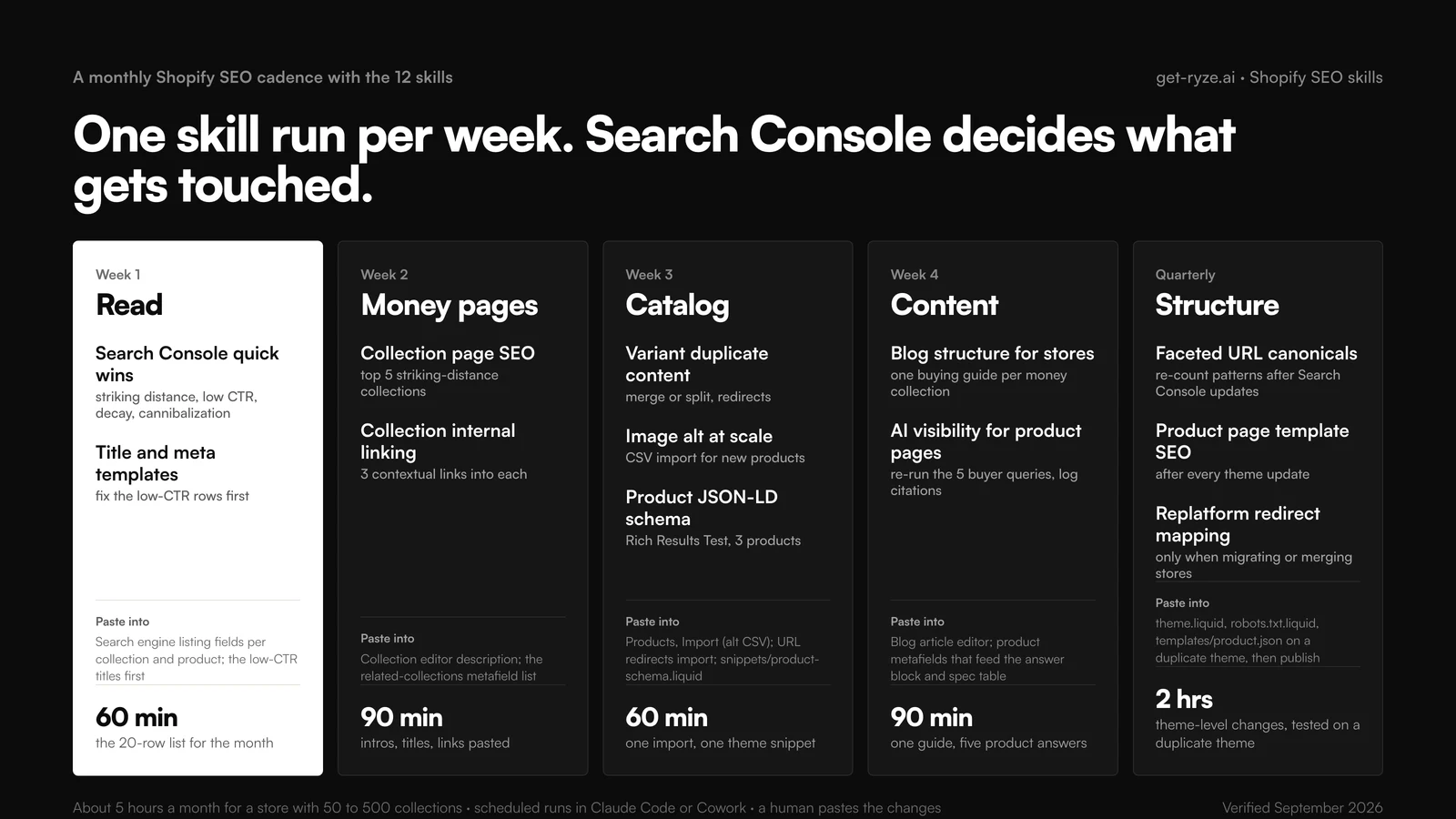
Monthly Shopify SEO cadence with the 12 Claude skills in five columns: week 1 read (search-console-quick-wins-for-stores, title-and-meta-templates, 60 minutes, paste into search engine listing fields), week 2 money pages (collection-page-seo on the top 5 striking-distance collections, collection-internal-linking, 90 minutes, paste into the collection editor and metafield list), week 3 catalog (variant-duplicate-content, image-alt-at-scale CSV import, product-json-ld-schema with Rich Results Test, 60 minutes), week 4 content (blog-structure-for-stores, ai-visibility-for-product-pages re-running five buyer queries, 90 minutes), quarterly structure (faceted-url-canonicals, product-page-template-seo after theme updates, replatform-redirect-mapping only when migrating, 2 hours on a duplicate theme). About five hours a month for 50 to 500 collections
About five hours a month for a store with 50 to 500 collections. In Claude Code or Cowork the scheduled rows run themselves; a person still pastes the changes.

The cadence is also the test of whether a skill earns its place. If week 3 keeps getting skipped, the catalog is clean and the slot should go to content; if week 1 keeps producing the same 20 rows, the pastes are not happening. For the hands-off version, automated SEO for Shopify with Claude skills covers scheduling, and Ryze’s SEO Autopilot applies the changes with an approval step instead of a paste.

How to adapt a skill to your theme

The files assume a Dawn-style theme (Online Store 2.0, JSON templates, a main-product section). Older or heavily customized themes need three edits, and none of them is a development task:

  • Input — replace the file names with yours. If the product page is sections/product-template.liquid, say so; if titles come from an SEO app rather than theme.liquid, name the app so title-and-meta-templates audits the right place.
  • Thresholds — the 120-word intro floor, the 200-impression cutoff, the 2% CTR line. A 5,000-SKU store raises the impression cutoff; a 40-product store lowers it. Keep the numbers in the file, not in your head.
  • Output — add the column your team needs (a Jira key, a metafield name) and end the section with “never add or remove columns”. Run 12 is then comparable with run 1.
  • Description — the trigger line. Rewrite it with the words your team uses. If people say “PLP”, put PLP in the description of collection-page-seo.

Writing a thirteenth: take the store job you did three times last quarter, write the steps from your notes in the same shape as the files above, run it on a job you already finished by hand, and diff the output. If you want the broader marketing library the format came from, the Claude marketing skills guide ranks it by job.

Troubleshooting

The skill never triggers

The description does not match your phrasing. Name it once (“use the collection-page-seo skill”) to confirm it works, then rewrite the description with the words you actually use.

It rewrites collections that already rank

Step 5 of collection-page-seo skips positions 1 to 3, but only when Search Console rows are attached. Without them the skill has no position; attach the export or the MCP connector.

The canonical advice contradicts what the theme prints

Some themes print a custom canonical or an app overrides it. Paste the rendered head of one collection and one product page; faceted-url-canonicals decides from what is served, not from the Liquid.

The alt-text import changed nothing

Shopify matches on Image Src. If the CSV was edited in a spreadsheet that rewrote the URLs or dropped the Handle column, the rows do not match. Re-export, edit only Image Alt Text, import with overwrite on.

Two Product schemas after the snippet

A review or SEO app still injects its own block. product-json-ld-schema lists the app blocks to disable; do that in the theme editor's app embeds before re-testing.

Frequently asked questions

What are Claude skills for Shopify SEO?

They are SKILL.md files that teach Claude one Shopify SEO job: collection page copy, faceted URL canonicals, Product JSON-LD, variant duplicates, replatform redirects, alt text, internal links, title templates and AI visibility. Each skill names its input, its steps and its output format, so the same audit runs the same way on every store. The 12 on this page are free to copy or download.

Is there a Claude SEO skill I can download as a SKILL.md?

Yes. Every skill on this page is shown in full as a SKILL.md and packed into one zip, shopify-seo-skills.zip, with 12 folders. Unzip it, then either upload a folder to claude.ai under Customize and Skills, or copy the folders into .claude/skills inside your theme repo for Claude Code.

How do I use Claude for Shopify SEO?

Install the skills, connect data, run one skill a week. Start with search-console-quick-wins-for-stores to get a 20-row list, then collection-page-seo on the striking-distance collections. Claude writes the intro, title and meta; you paste them into the collection editor. With an MCP connector attached, the skills read Search Console and the store directly.

What is the difference between these Shopify skills and the general Claude SEO skill?

The general Claude SEO skill audits any site: crawl, content gaps, backlinks. These 12 are written around Shopify's structure: handles, /collections/handle/products/handle duplicates, tag paths, filter parameters, the /blogs/ segment, the product CSV columns and theme.liquid. A generic skill does not know that a ?variant= URL already canonicalizes to the product, or where robots.txt.liquid lives.

Do the skills need a Shopify MCP connection?

No. Every skill lists the export it needs: a product CSV, a Search Console export, a theme file. Paste or attach those and the skill runs. An MCP connector removes the export step so Claude reads Search Console and the catalog live, which matters once you run the skills monthly across many collections.

How do I install a Claude skill in claude.ai?

Enable code execution under Settings, then Capabilities. Open Customize, then Skills, click the plus button, choose Create skill, then Upload a skill, and upload one skill folder as a zip. Toggle it on. From then on a request that matches the skill's description triggers it; you can also name the skill in the prompt.

How do I install these skills in Claude Code for a Shopify theme?

Unzip the download and copy the 12 folders into .claude/skills at the root of your theme repository, next to the layout, sections and templates folders. Commit them so the whole team runs the same version. Invoke one with /collection-page-seo or /faceted-url-canonicals, or let Claude pick it when the request matches.

Can Claude fix Shopify duplicate content from collection product URLs?

The variant-duplicate-content and faceted-url-canonicals skills cover it. Shopify already canonicalizes /collections/handle/products/handle to /products/handle and strips ?variant= and filter parameters in canonical_url; the skills confirm your theme prints that tag, then decide index, canonical or noindex for tag paths, sort parameters and vendor pages from Search Console data.

Can Claude write Product schema for Shopify?

Yes, from Liquid rather than hard-coded values. The product-json-ld-schema skill builds one Product block with offers from variant prices and availability, adds aggregateRating only when the review app exposes it in Liquid, and lists the app blocks to disable so the page does not carry two Product schemas. Validate with the Rich Results Test on three products.

Which Shopify SEO skill should I run first?

search-console-quick-wins-for-stores. It turns two 90-day Search Console periods into four short tables: striking-distance queries, low-CTR pages, decaying pages and cannibalization, each row naming the skill to run next. Everything else on this page works from that list, so you spend the month on pages with proven impressions.

Can these skills run on a schedule?

Yes. In Claude Code or Cowork, pair a skill with a schedule: the Search Console review on the first of the month, the title and meta pass a week later. The skills only produce lists and copy; a person still pastes changes into Shopify. For hands-off execution, an autonomous layer like Ryze AI applies SEO changes with an approval step.

Are the 12 Shopify SEO skills free?

Yes. Ryze wrote them for this guide and publishes them without a license fee; copy them from the page or download the zip and edit them for your theme. You need a Claude account to run them. The download does not include store data or an MCP connector; those come from your Shopify admin and Search Console.

How do I adapt a skill to my Shopify theme?

Change three things. The Input section: name your theme's section files (main-product.liquid in Dawn-based themes, different names elsewhere). The thresholds: word counts, impression cutoffs, CTR floors. The Output section: add a column your team needs and state that columns never change. Keep the description line specific so the right skill triggers on your phrasing.


Let AI run your store SEO

Shopify + Search Console · monthly audits

Start the trial
Live results across
2,000+ clients

Paid Ads

Avg. client
ROAS
0x
Revenue
driven
$0M

SEO

Organic
visits driven
0M
Keywords
on page 1
48k+

Websites

Conversion
rate lift
+0%
Time
on site
+0%
Last updated: Sep 8, 2026
All systems ok